This page has been machine-translated from the original page. In this chapter, I explain AMSI providers, which perform scans requested by applications.
The sample code used in this chapter is distributed as iantimalwareprovider-sample.zip at:
https://github.com/microsoft/Windows-classic-samples/releases/tag/MicrosoftDocs-Samples
Like the sample in Chapter 2, the AMSI provider sample is implemented in a single file, AmsiProvider.cpp,
and has fewer than 300 lines, making it easy to understand.
Also, as with the sample in Chapter 2, you can build it by opening the downloaded solution file in Visual Studio.
Table of contents
AmsiProvider components
The sample provider in this chapter, AmsiProvider,
is mainly implemented by the SampleAmsiProvider class that inherits IAntimalwareProvider.
It defines concrete behavior for the following three methods in IAntimalwareProvider.1
ScanDisplayNameCloseSession
In addition, the sample contains implementation for: registration of the built DLL as an AMSI provider, and functions to output events as ETW trace sessions.
Run the sample provider
After registering SampleAmsiProvider in the system as an AMSI provider,
it performs the following for incoming scan requests.
- After scan starts, output obtained AMSI attributes to ETW trace session.
- XOR all bytes of received scan target data and output the result to ETW trace session.
- Return
AMSI_RESULT_NOT_DETECTEDfor all scan requests.
In this section, we build and run the provider in a VM to confirm this behavior.
Register the sample provider
First, place the built files in your VM as in Chapter 2, then run the following command in an elevated command prompt to register it as an AMSI provider.
regsvr32 AmsiProvider.dllBy this command, {2E5D8A62-77F9-4F7B-A90C-2744820139B2} (SampleAmsiProvider ID)
is newly registered under HKEY_LOCAL_MACHINE\SOFTWARE\Microsoft\AMSI\Providers.

You can also confirm under
HKEY_LOCAL_MACHINE\SOFTWARE\Classes\CLSID\{2E5D8A62-77F9-4F7B-A90C-2744820139B2}
that the CLSID and DLL path were written as a COM server registration.

Process AMSI scan requests with the sample provider
After registering SampleAmsiProvider, verify its behavior.
This sample provider outputs ETW trace logs with GUID {00604c86-2d25-46d6-b814-cd149bfdf0b3}.
So by collecting events corresponding to this GUID, you can confirm provider behavior.
As introduced in Chapter 1, ETW traces can be collected by tools like logman or xperf.
In this chapter we use traceview.exe included in Windows WDK.
traceview.exe is convenient because you can easily collect and view ETW logs in GUI.
If WDK is installed, run:
C:\Program Files (x86)\Windows Kits\10\bin\<version>\x64\traceview.exe2
After launching traceview.exe, start a new trace session with GUID {00604c86-2d25-46d6-b814-cd149bfdf0b3}.
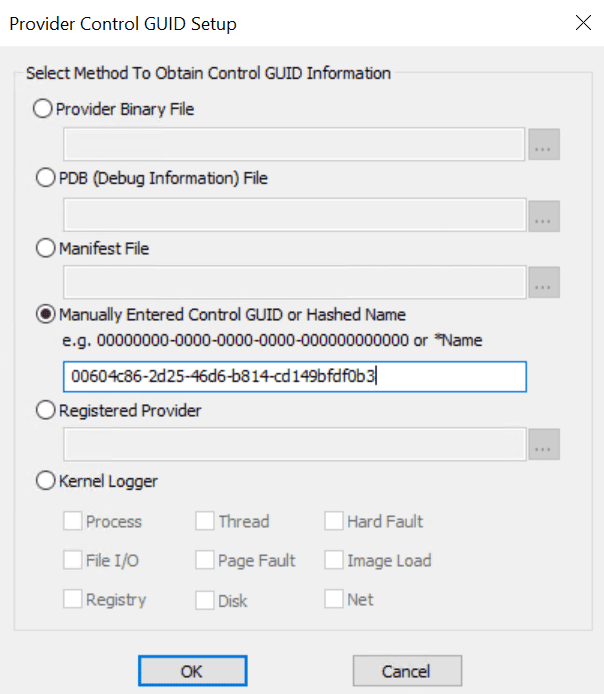
This GUID is defined in sample code as follows.
// Define a trace logging provider:
// 00604c86-2d25-46d6-b814-cd149bfdf0b3
TRACELOGGING_DEFINE_PROVIDER(
  g_traceLoggingProvider, "SampleAmsiProvider",
  (0x00604c86, 0x2d25, 0x46d6, 0xb8, 0x14, 0xcd, 0x14, 0x9b, 0xfd, 0xf0, 0xb3)
);
After starting the trace session, run sample program AmsiStream from Chapter 2 to issue AMSI scan requests.
Then you can confirm in Trace View GUI that multiple events are output by SampleAmsiProvider.

The first event recorded contains only text: "Loaded".
{
  "meta": {
    "provider": "SampleAmsiProvider",
    "event": "Loaded",
    /* omitted */
  }
}
Next, an event with text "Scan Start" and "requestNumber": 1 is recorded.
This indicates scanning has started in SampleAmsiProvider.
requestNumber records the count of requested scans managed by the provider.
{
  "requestNumber": 1,
  "meta": {
    "provider": "SampleAmsiProvider",
    "event": "Scan Start",
    /* omitted */
  }
}
When scan starts, events for AMSI attributes are recorded.
In the event below, values such as AMSI_ATTRIBUTE_APP_NAME and AMSI_ATTRIBUTE_CONTENT_ADDRESS
returned from AmsiStream are recorded.
{
  "requestNumber": 1,
  "App Name": "Contoso Script Engine v3.4.9999.0",
  "Content Name": "Sample content.txt",
  "Content Size": 13,
  "Session": 0,
  "Content Address": "0x7FF79C43FBF8",
  "meta": {
    "provider": "SampleAmsiProvider",
    "event": "Attributes",
    /* omitted */
  }
}
Finally, the provider outputs result as XOR of each byte of data received by AMSI scan.
{
  "requestNumber": 1,
  "result": 44,
  "meta": {
    "provider": "SampleAmsiProvider",
    "event": "Memory xor",
    /* omitted */
  }
}
This matches XOR of bytes in Hello, world used by AmsiStream memory scan,
as confirmed by the Python script below.
scan_conten = "Hello, world"
result = 0

for byte_data in scan_conten:
    result ^= ord(byte_data)

print(result) # 44
This confirms that SampleAmsiProvider receives AMSI scan requests and processes content.
AMSI provider implementation
Now that behavior is confirmed, we go through implementation details.
The following steps simplify behavior of registered sample provider SampleAmsiProvider.
- DLLs of AMSI providers registered in the system are loaded by AMSI.
- In
DLLMain, ETW provider registration and COM component initialization are performed. Scanmethod runs in response to client application requests.- AMSI attributes are obtained from client application and output as ETW logs.
- Read scan data from client application and output XOR result of each byte as ETW logs.
This chapter traces provider execution mainly around SampleAmsiProvider,
which inherits IAntimalwareProvider.
Behavior for loading provider DLLs by interfaces in amsi.dll
is not included in public sample code, so this book does not cover it.
However, Chapter 10 of Evading EDR (also used as a reference in this book) explains this behavior in detail if you are interested.3
SampleAmsiProvider class implementation
Core class SampleAmsiProvider is implemented as follows.
class
  DECLSPEC_UUID("2E5D8A62-77F9-4F7B-A90C-2744820139B2")
  SampleAmsiProvider : \
    public RuntimeClass<RuntimeClassFlags<ClassicCom>,
           IAntimalwareProvider,
           FtmBase>
{
public:
  IFACEMETHOD(Scan)(_In_ IAmsiStream* stream,
                    _Out_ AMSI_RESULT* result) override;
  IFACEMETHOD_(void, CloseSession) \
                   (_In_ ULONGLONG session) override;
  IFACEMETHOD(DisplayName) \
                   (_Outptr_ LPWSTR* displayName) override;

private:
  // We assign each Scan request
  // a unique number for logging purposes.
  LONG m_requestNumber = 0;
};
As shown, SampleAmsiProvider is defined as a COM component inheriting IAntimalwareProvider
and overrides required methods (Scan, CloseSession, DisplayName).
Its CLSID is {2E5D8A62-77F9-4F7B-A90C-2744820139B2}.
Private member m_requestNumber is used as a counter for scan requests recorded as requestNumber in ETW logs.
Overridden Scan receives arguments as defined by IAntimalwareProvider
and returns scan result (AMSI_RESULT).4
HRESULT SampleAmsiProvider::Scan(
          _In_ IAmsiStream* stream,
          _Out_ AMSI_RESULT* result
        )
When called, it first records scan start in ETW logs with incremented m_requestNumber using InterlockedIncrement.
LONG requestNumber = InterlockedIncrement(&m_requestNumber);

TraceLoggingWrite(g_traceLoggingProvider,
                  "Scan Start",
                  TraceLoggingValue(requestNumber)
                );
Then it obtains AMSI attributes from the client using GetStringAttribute and GetFixedSizeAttribute.
auto appName = GetStringAttribute(
                 stream,
                 AMSI_ATTRIBUTE_APP_NAME
               );

auto contentName = GetStringAttribute(
                    stream,
                    AMSI_ATTRIBUTE_CONTENT_NAME
                  );

auto contentSize = GetFixedSizeAttribute<ULONGLONG>(
                     stream,
                     AMSI_ATTRIBUTE_CONTENT_SIZE
                   );

auto session = GetFixedSizeAttribute<ULONGLONG>(
                 stream,
                 AMSI_ATTRIBUTE_SESSION
               );

auto contentAddress = GetFixedSizeAttribute<PBYTE>(
                        stream,
                        AMSI_ATTRIBUTE_CONTENT_ADDRESS
                      );
Both helper functions are wrapper functions around IAmsiStream::GetAttribute.
Their implementation is explained later.
Obtained attributes are output to ETW logs here:
TraceLoggingWrite(
  g_traceLoggingProvider,"Attributes",
  TraceLoggingValue(requestNumber),
  TraceLoggingWideString(appName.Get(),"App Name"),
  TraceLoggingWideString(contentName.Get(),"Content Name"),
  TraceLoggingUInt64(contentSize,"Content Size"),
  TraceLoggingUInt64(session,"Session"),
  TraceLoggingPointer(contentAddress,"Content Address")
);
Next, SampleAmsiProvider processes requested scan content.
Behavior changes depending on whether memory address (contentAddress) for scan content
from attribute AMSI_ATTRIBUTE_CONTENT_ADDRESS is available.
If contentAddress is available, Scan calls CalculateBufferXor
and writes XOR result of in-memory data bytes to events.
// The data to scan is provided in the form of a memory buffer.
auto result = CalculateBufferXor(
                contentAddress,
                contentSize
              );

TraceLoggingWrite(g_traceLoggingProvider, "Memory xor",
   TraceLoggingValue(requestNumber),
   TraceLoggingValue(result));
In this sample provider, no real malware scanning is performed,
so processing is implemented by CalculateBufferXor.
It simply XORs data in the buffer byte by byte and returns the result.
BYTE CalculateBufferXor(
  _In_ LPCBYTE buffer,
   _In_ ULONGLONG size
) {
  BYTE value = 0;
  for (ULONGLONG i = 0; i < size; i++)
  {
    value ^= buffer[i];
  }
  return value;
}
In a real AMSI provider, this part would use a scan engine from installed anti-malware products.
If contentAddress cannot be obtained,
SampleAmsiProvider reads content chunk by chunk using IAmsiStream::Read.
// Provided as a stream. Read it stream a chunk at a time.
BYTE cumulativeXor = 0;
BYTE chunk[1024];
ULONG readSize;

for (ULONGLONG position = 0;
     position < contentSize;
     position += readSize
    )
{
  HRESULT hr = stream->Read(
                position,
                sizeof(chunk),
                chunk,
                &readSize
              );

  if (SUCCEEDED(hr))
  {
    cumulativeXor ^= CalculateBufferXor(chunk, readSize);
    TraceLoggingWrite(g_traceLoggingProvider,"Read chunk",
      TraceLoggingValue(requestNumber),
      TraceLoggingValue(position),
      TraceLoggingValue(readSize),
      TraceLoggingValue(cumulativeXor));
  }
  else
  {
    TraceLoggingWrite(g_traceLoggingProvider,"Read failed",
      TraceLoggingValue(requestNumber),
      TraceLoggingValue(position),
      TraceLoggingValue(hr));
    break;
  }
}
Like the previous path, it writes XOR results to ETW logs,
but data is obtained via Read instead of direct memory pointer access.
DisplayName, another overridden method, is simple.5
It returns provider name.
HRESULT SampleAmsiProvider::DisplayName(
  _Outptr_ LPWSTR *displayName
) {
  *displayName = const_cast<LPWSTR>(L"Sample AMSI Provider");
  return S_OK;
}
As shown in Chapter 2, the sample client uses it to print provider name received from Scan.
PWSTR name;
hr = provider->DisplayName(&name);

if (SUCCEEDED(hr)) {
  wprintf(L"Provider display name: %s\n",
          name
         );
 CoTaskMemFree(name);
}
Final method CloseSession is implemented to output only "Close session" to ETW.
void SampleAmsiProvider::CloseSession(_In_ ULONGLONG session)
{
  TraceLoggingWrite(
    g_traceLoggingProvider,
    "Close session",
    TraceLoggingValue(session)
  );
}
In actual providers, because CloseSession is defined for closing specific AMSI sessions,
it may also release resources depending on implementation.6
GetStringAttribute function implementation
GetStringAttribute is used in Scan to get
AMSI_ATTRIBUTE_APP_NAME and AMSI_ATTRIBUTE_CONTENT_NAME.
It receives IAmsiStream object and requested AMSI_ATTRIBUTE value.
HeapMemPtr<wchar_t> GetStringAttribute(
  _In_ IAmsiStream* stream,
  _In_ AMSI_ATTRIBUTE attribute
)
The return type HeapMemPtr is a class defined in the sample provider
for heap allocation and release using HeapAlloc.
GetStringAttribute is implemented as follows.
HeapMemPtr<wchar_t> result;

ULONG allocSize;
ULONG actualSize;
if (
  stream->GetAttribute(
            attribute,
            0,
            nullptr,
            &allocSize
          ) == E_NOT_SUFFICIENT_BUFFER &&
  SUCCEEDED(result.Alloc(allocSize)) &&
  SUCCEEDED(stream->GetAttribute(
            attribute,
            allocSize,
            reinterpret_cast<PBYTE>(result.Get()),
            &actualSize
           )
          ) && actualSize <= allocSize)
{
  return result;
}
return HeapMemPtr<wchar_t>();
To determine required size first, it intentionally calls GetAttribute
with second argument 0 and checks for E_NOT_SUFFICIENT_BUFFER.
stream->GetAttribute(
         attribute,
         0,
         nullptr,
         &allocSize
       ) == E_NOT_SUFFICIENT_BUFFER
As explained in Chapter 2 (GetAttribute parameter table),
when GetAttribute returns E_NOT_SUFFICIENT_BUFFER,
the required byte count is written into the output size argument (retData/actualSize).
After confirming required size,
it allocates memory with result.Alloc(allocSize) and calls GetAttribute again
to receive requested attribute into buffer returned by result.Get().
stream->GetAttribute(
          attribute,
          allocSize,
          reinterpret_cast<PBYTE>(result.Get()),
          &actualSize
        )
GetFixedSizeAttribute function implementation
Unlike GetStringAttribute, GetFixedSizeAttribute is for fixed-size attributes,
such as AMSI_ATTRIBUTE_CONTENT_SIZE, AMSI_ATTRIBUTE_SESSION, and AMSI_ATTRIBUTE_CONTENT_ADDRESS.
So its implementation is simpler.
It receives attribute value from GetAttribute into a fixed-size buffer.
template<typename T>
T GetFixedSizeAttribute(
  _In_ IAmsiStream* stream,
  _In_ AMSI_ATTRIBUTE attribute
) {
    T result;

    ULONG actualSize;
    if (SUCCEEDED(stream->GetAttribute(
                   attribute,
                   sizeof(T),
                   reinterpret_cast<PBYTE>(&result),
                   &actualSize
                 )
                ) &&
        actualSize == sizeof(T))
    {
        return result;
    }
    return T();
}
Chapter 3 Summary
This chapter explained how sample provider AmsiProvider uses AMSI to receive and process requested scan content.
From this sample, to process scans requested through AMSI, the following are required.
- Register an AMSI provider in the system.
- Override each method defined in
IAntimalwareProvider. - When
Scanrequests arrive through AMSI, obtain AMSI attributes and scan content. - Run desired processing (such as anti-malware scan) on obtained content and return result (
AMSI_RESULT).
In this chapter, sample provider AmsiProvider always returns AMSI_RESULT_NOT_DETECTED,
so we could not verify blocking behavior based on provider results.
Therefore, in Chapter 4, we customize the sample code explained so far to: confirm content can be blocked by the provider we register, and deepen understanding of AMSI scan behavior.
Book table of contents
- Foreword
- Chapter 1: About AMSI (Windows Antimalware Scan Interface)
- Chapter 2: AMSI Client Interface
- Chapter 3: AMSI Provider
- Chapter 4: Customizing the Sample Programs
- Chapter 5: AMSI Integrated into PowerShell
-
IAntimalwareProvider interface https://learn.microsoft.com/en-us/windows/win32/api/amsi/nn-amsi-iantimalwareprovider
↩ -
Download the Windows Driver Kit (WDK) https://learn.microsoft.com/ja-jp/windows-hardware/drivers/download-the-wdk
↩ -
Evading EDR p.189 (Matt Hand / No Starch Press / 2023)
↩ -
IAntimalwareProvider::Scan method https://learn.microsoft.com/ja-jp/windows/win32/api/amsi/nf-amsi-iantimalwareprovider-scan
↩ -
IAntimalwareProvider::DisplayName method https://learn.microsoft.com/ja-jp/windows/win32/api/amsi/nf-amsi-iantimalwareprovider-displayname
↩ -
IAntimalwareProvider::CloseSession method https://learn.microsoft.com/ja-jp/windows/win32/api/amsi/nf-amsi-iantimalwareprovider-closesession
↩