This page has been machine-translated from the original page. In this chapter, we customize the sample programs explained in Chapters 2 and 3 to deepen understanding of AMSI scans.
Specifically, we apply the following customizations.
-
Sample provider
- Output requested scan content.
- Implement a simple content scanner and perform blocking.
-
Sample program
- Store an input string as memory content and scan it with AMSI.
The customized sample code is published in the repository below.
https://github.com/kash1064/AMSI-Samples
Table of contents
Customize the AMSI provider
First, customize the AMSI provider sample from Chapter 3.
As explained earlier, the sample AMSI provider does not perform real scanning,
and returns AMSI_RESULT_NOT_DETECTED for all requests.
So this time, we implement a simple scanner in the provider and add functionality to judge content as malicious.
Add scanning capability to the sample provider
As confirmed in Chapter 3, when SampleAmsiProvider can obtain contentAddress,
it executes the following code in Scan:
CalculateBufferXor is called and the XOR result of memory bytes is written to events.
// The data to scan is provided in the form of a memory buffer.
auto result = CalculateBufferXor(
                contentAddress,
                contentSize
              );

TraceLoggingWrite(g_traceLoggingProvider, "Memory xor",
   TraceLoggingValue(requestNumber),
   TraceLoggingValue(result));
In this chapter, this block is commented out,
and replaced with a call to new function MemoryContentScan.
*result = MemoryContentScan(contentAddress, contentSize, appName.Get());MemoryContentScan takes three arguments:
buffer and size of target data,
and AMSI_ATTRIBUTE_APP_NAME obtained from the requesting application.
It branches behavior depending on whether the scan request comes from sample program AmsiStream or PowerShell.
AMSI_RESULT MemoryContentScan(
  _In_ LPCBYTE buffer,
  _In_ ULONGLONG size,
  _In_ PCWSTR appName)
{

    if (wcsncmp(
          appName,
          L"Contoso Script Engine",
          wcslen(L"Contoso Script Engine")
        ) == 0)
    {
        /* Handle scan request from sample program */
    }
    else if (wcsncmp(
              appName,
              L"PowerShell",
              wcslen(L"PowerShell")
            ) == 0)
    {
        /* Handle scan request from PowerShell */
    }

    return AMSI_RESULT_NOT_DETECTED;

}
If the requester is AmsiStream,
it outputs scan target ASCII string from the buffer to ETW,
then checks whether content contains either Malicious or Clean.
LPSTR ascii_text = (LPSTR)malloc(
                            strlen((const char*)buffer) + 1
                          );
if (!ascii_text) return AMSI_RESULT_NOT_DETECTED;
memcpy(ascii_text, buffer, strlen((const char*)buffer));
ascii_text[strlen((const char*)buffer)] = '\0';

TraceLoggingWrite(
  g_traceLoggingProvider,
  "Scan Contoso Script Engine Content",
  TraceLoggingString(ascii_text, "Buffer")
);

static const char malicious[] = "Malicious";
static const char clean[] = "Clean";
size_t len_malicious = strlen(malicious);
size_t len_clean = strlen(clean);

for (size_t i = 0; i <= strlen(ascii_text); i++) {
  if (i <= strlen(ascii_text) - len_malicious) {
    if (memcmp(
          &ascii_text[i],
          malicious,
          len_malicious
        ) == 0)
    {
      return AMSI_RESULT_DETECTED;
    }
  }

  if (i <= strlen(ascii_text) - len_clean) {
    if (memcmp(&ascii_text[i], clean, len_clean) == 0) {
      return AMSI_RESULT_CLEAN;
    }
  }
}
If content includes Malicious, provider returns AMSI_RESULT_DETECTED.
If content includes Clean, provider returns AMSI_RESULT_CLEAN.
If neither string is found, provider finally returns AMSI_RESULT_NOT_DETECTED.
If requester is PowerShell,
the provider outputs received scan content to ETW,
then checks for wide strings Malicious-Script or Clean-Script.
TraceLoggingWrite(
  g_traceLoggingProvider,
  "Scan PowerShell Content",
  TraceLoggingCountedWideString(
    (PCWSTR)buffer,
    wcslen((PCWSTR)buffer),
    "Buffer"
  )
);

static const wchar_t malicious[] = L"Malicious-Script";
static const wchar_t clean[] = L"Clean-Script";
size_t len_malicious = wcslen(malicious);
size_t len_clean = wcslen(clean);

for (size_t i = 0; i <= size; i++) {
  if (i <= size - len_malicious) {
    if (wcsncmp(
         (PCWSTR)&buffer[i],
         malicious,
         len_malicious
        ) == 0)
    {
        return AMSI_RESULT_DETECTED;
    }
  }

  if (i <= size - len_clean) {
    if (wcsncmp(
         (PCWSTR)&buffer[i],
         clean,
         len_clean
        ) == 0)
    {
        return AMSI_RESULT_CLEAN;
    }
  }
}
As with sample program requests,
if Malicious-Script is found it returns AMSI_RESULT_DETECTED,
and if Clean-Script is found it returns AMSI_RESULT_CLEAN.
Customize the sample program
Next, add a function to input any string into AmsiStream explained in Chapter 2.
Add input capability to the sample program
As explained in Chapter 2, when no command-line arguments are provided,
AmsiStream scans a hardcoded global constant SampleStream.
So first, redefine SampleStream like below,
and use it as a buffer to store text from standard input.
#define BUF_SIZE 256
char SampleStream[BUF_SIZE];
Then add the following code just before initializing CAmsiMemoryStream in ScanArguments,
so text read from standard input is written into global SampleStream.
// Scan a single memory stream.
wprintf(L"Creating memory stream object\n");
wprintf(L"Please input for memory stream scan\n");

if (fgets(SampleStream, BUF_SIZE, stdin) != NULL) {
  SampleStream[strcspn(SampleStream, "\n")] = '\0';
}

printf("Input text: %s\n", SampleStream);
Now arbitrary input text can be scanned.
Run the customized programs
Next, rebuild both customized sample program and sample provider, install them in the VM, and verify behavior.
If the sample provider is already registered, unload it first before replacing the DLL.
regsvr32 /u AmsiProvider.dllAfter placing rebuilt AmsiProvider.dll in the VM,
register it again from an elevated command prompt as in Chapter 3.
regsvr32 AmsiProvider.dllNext, start traceview.exe (same as Chapter 3),
and start a new trace session with sample provider GUID {00604c86-2d25-46d6-b814-cd149bfdf0b3}.
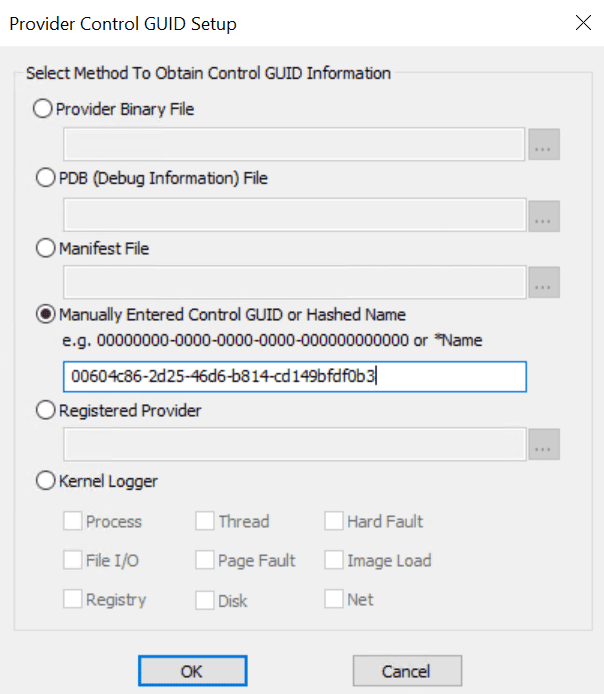
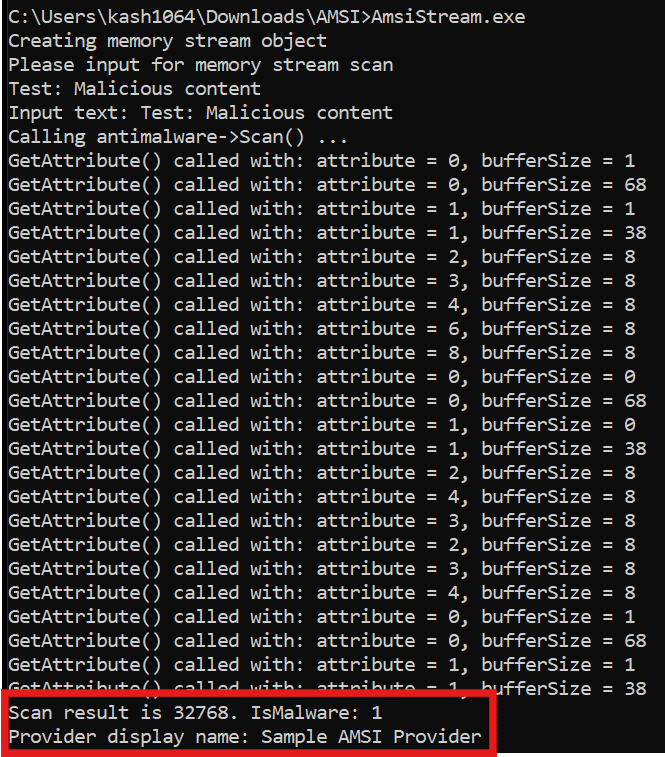
When all preparation is complete, run rebuilt AmsiStream. You can confirm that:
- arbitrary input from stdin can be used as scan target,
- text containing
Maliciousis detected by the sample provider.
In ETW trace logs collected by traceview.exe,
you can also confirm that provider scanned the string Test: Malicious content.
{
  "Buffer": "Test: Malicious content",
  "meta": {
    "provider": "SampleAmsiProvider",
    "event": "Scan Contoso Script Engine Content",
    /* omitted */
  }
}
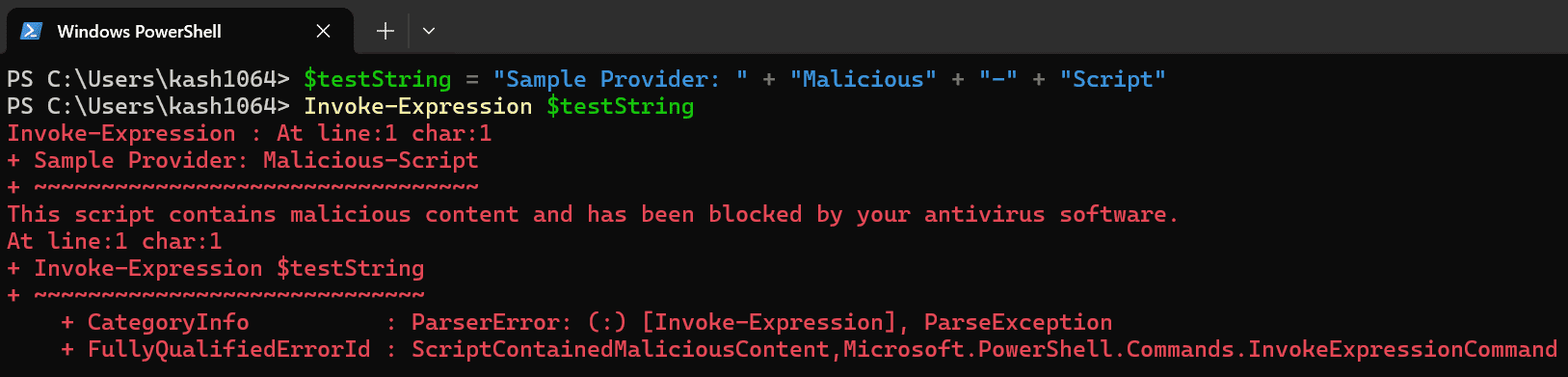
Next, verify detection by running the following PowerShell command.
$testString = "Sample Provider: " + "Malicious" + "-" + "Script"
Invoke-Expression $testString
When this command is executed, first line alone avoids detection
because Malicious-Script is split (obfuscated).
However, on line 2 (Invoke-Expression $testString),
the split string is concatenated and evaluated,
so malicious wide string Malicious-Script is detected by the sample provider,
and command execution is blocked by AMSI.
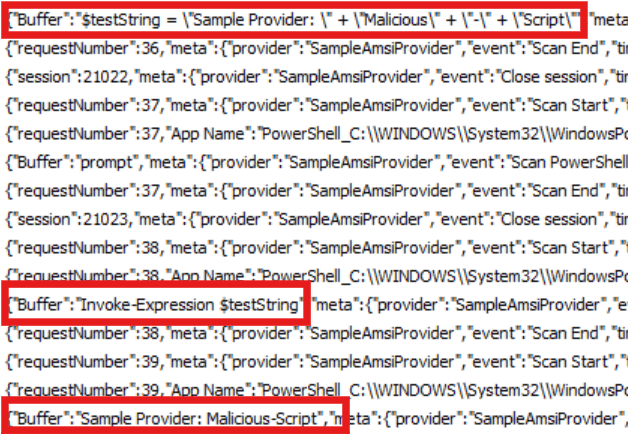
At this time, ETW logs from the sample provider also allow you to trace
scan content flow from PowerShell until malicious Malicious-Script reaches the provider.
Chapter 4 Summary
In this chapter, we customized the sample code explained so far and added the following functions.
-
Sample provider
- Output requested scan content.
- Implement a simple content scanner and block execution.
-
Sample program
- Save input text as memory content and scan it with AMSI.
In the final Chapter 5, I explain how AMSI is integrated in real products, using PowerShell (whose source code is available as OSS) as an example.