This page has been machine-translated from the original page. In this chapter, I explain the implementation of a client application that requests AMSI scans using publicly available sample code.
The sample code used in this chapter is distributed as amsistream-sample.zip at:
https://github.com/microsoft/Windows-classic-samples/releases/tag/MicrosoftDocs-Samples
This sample program, AmsiStream, is implemented in a single file: AmsiStream.cpp.
AmsiStream.cpp is around 300 lines, so the implementation is relatively easy to follow.
Extract the downloaded ZIP and open AmsiStream.sln in Visual Studio to build the sample code.
Table of contents
AmsiStream components
The AmsiStream sample program used in this chapter is mainly implemented with the following classes.
- CAmsiStreamBase class
- CStreamScanner class
- CAmsiFileStream class
- CAmsiMemoryStream class
Below is a summary of each class.
CAmsiStreamBase class
CAmsiStreamBase is a base class inherited by CAmsiFileStream and CAmsiMemoryStream and defines the following methods.
SetContentNameBaseGetAttributeCopyAttribute
SetContentName stores information such as the name of the file to scan.
BaseGetAttribute and CopyAttribute define processing for attributes, which are important elements of AMSI scanning and will be described later.
These methods are used by both:
CAmsiFileStream (for file scans) and
CAmsiMemoryStream (for memory data scans).
CStreamScanner class
CStreamScanner creates AMSI COM objects implemented in amsi.dll
and directly performs AMSI scan requests.
This class defines two methods.
InitializeScanStream
Among them, ScanStream is responsible for scanning content using AMSI’s Scan method and displaying the result.
The sample program used here does not execute code like PowerShell. So the AMSI scan result is only displayed in the console.
CAmsiFileStream class
CAmsiFileStream is used when AmsiStream requests scans for files.
This class is implemented with Windows Runtime C++ Template Library (WRL), which can be used to implement COM components.
It defines the following three methods.
RuntimeClassInitializeGetAttributeRead
RuntimeClassInitialize is used to initialize WRL class objects via MakeAndInitialize.1
CAmsiFileStream is initialized by MakeAndInitialize inside ScanArguments, which is called from the entry point wmain.
GetAttribute and Read implement methods declared in the IAmsiStream interface.
IAmsiStream::GetAttribute returns requested attributes from the stream.
IAmsiStream::Read returns content up to the requested buffer size in response to AMSI provider requests.
In CAmsiFileStream, because the target is a file,
Read is implemented to return data read from the target file.
CAmsiMemoryStream class
CAmsiMemoryStream is used in AmsiStream when requesting scans for memory content.
This class is also implemented using WRL and defines the same three methods as CAmsiFileStream.
RuntimeClassInitializeGetAttributeRead
The purpose of these methods is the same, but the processing differs so they work for memory content instead of files.
For example, Read returns hardcoded data loaded in the sample program’s memory,
instead of content read from a file.
Run the sample program
Build the sample program
Before going into implementation details of AmsiStream, first build and run the sample.
To build, extract iamsistream-sample.zip, then open AmsiStream.sln in Visual Studio.
(This book uses Visual Studio 2022.)
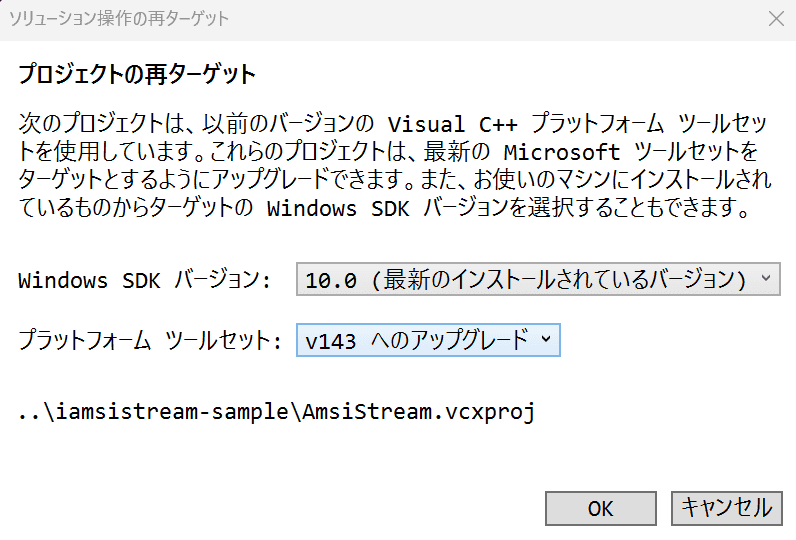
If a project retargeting dialog appears when opening the solution, you can click OK with default settings.
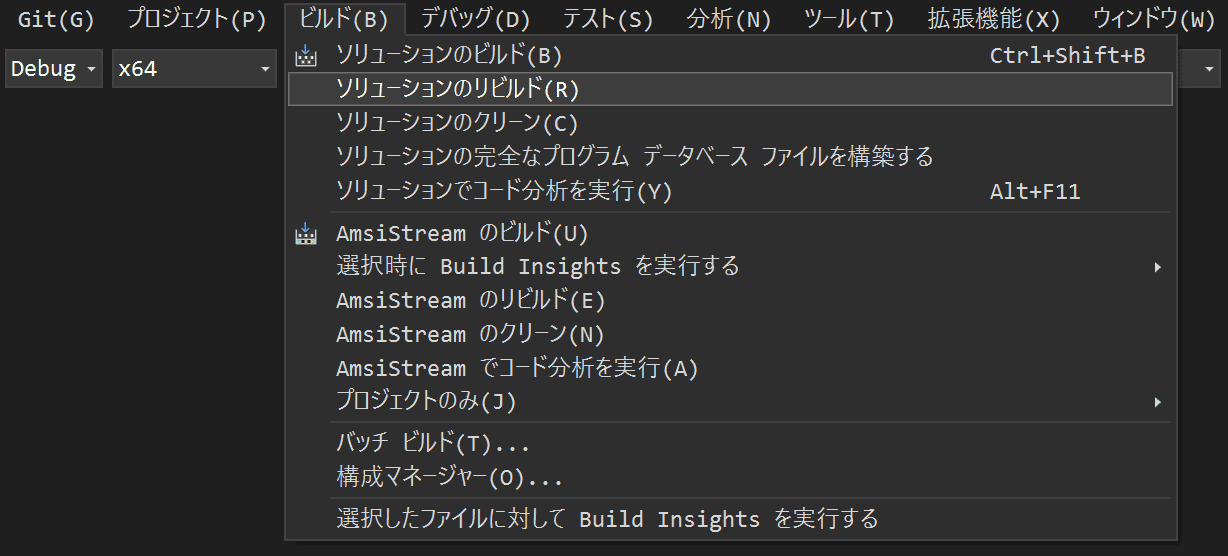
After opening the solution in Visual Studio, click Rebuild Solution from the top menu.
Keep build configuration as Debug for later debugging.
When the build succeeds, you can confirm that AmsiStream.exe and AmsiStream.pdb
were created under ./iamsistream-sample/x64/Debug.
Scan memory content with the sample
If you run AmsiStream.exe without command-line arguments,
scan-related information is printed on the command line as shown below.
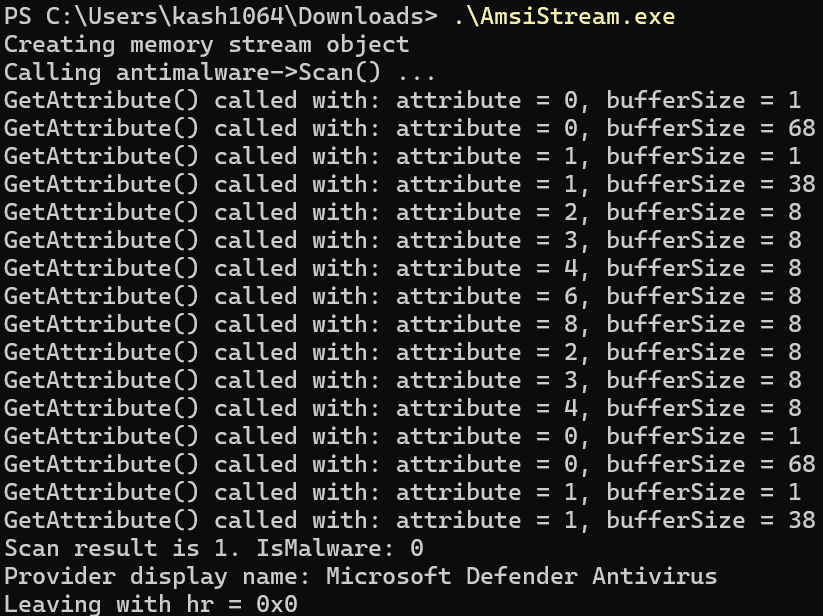
At this time, AmsiStream scans the in-memory string Hello, world through AMSI.
To verify that Hello, world was actually scanned,
you can capture ETW trace events using the procedure from Chapter 1.
However, when using Get-AMSIEvent from Chapter 1,
[Text.Encoding]::Unicode.GetString($_.Properties[7].Value) encodes scan content as UTF-16 LE,
so you cannot confirm that Hello, world was scanned.3
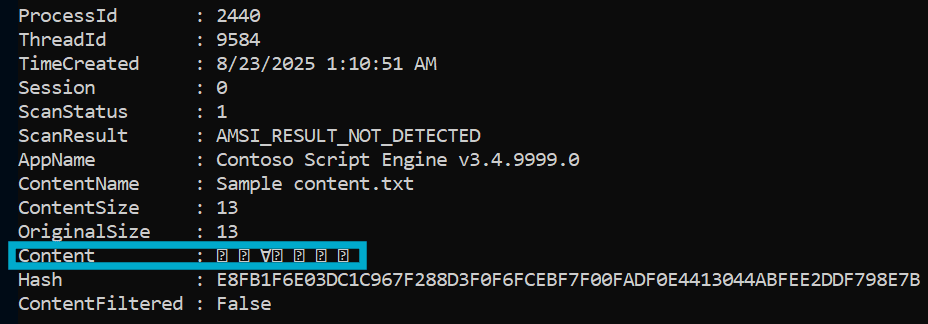
So here we use the standard Get-WinEvent cmdlet to inspect AMSI content from ETL files.
To inspect data scanned by AMSI, first get the saved AMSITrace.etl into $Events.
$Events = Get-WinEvent -Path "$($env:USERPROFILE)\Downloads\AMSITrace.etl" -OldestEvents retrieved by this command are stored as EventRecord class objects.4

Next, extract AMSI-scanned content from these events.
In Get-AMSIEvent, Properties[4].Value is treated as ContentName
and Properties[7].Value as AMSIContent.
By running the commands below, you can confirm that:
ContentName is Sample content.txt,
and the scanned data is indeed Hello, world.
# ContentName
$Events[2].Properties[4].Value

# AMSIContent
[Text.Encoding]::UTF8.GetString($Events[2].Properties[7].Value)

Scan files with the sample
Next, try file scanning with AmsiStream.
In AmsiStream, if you pass file paths as command-line arguments, it scans data from files instead of memory.
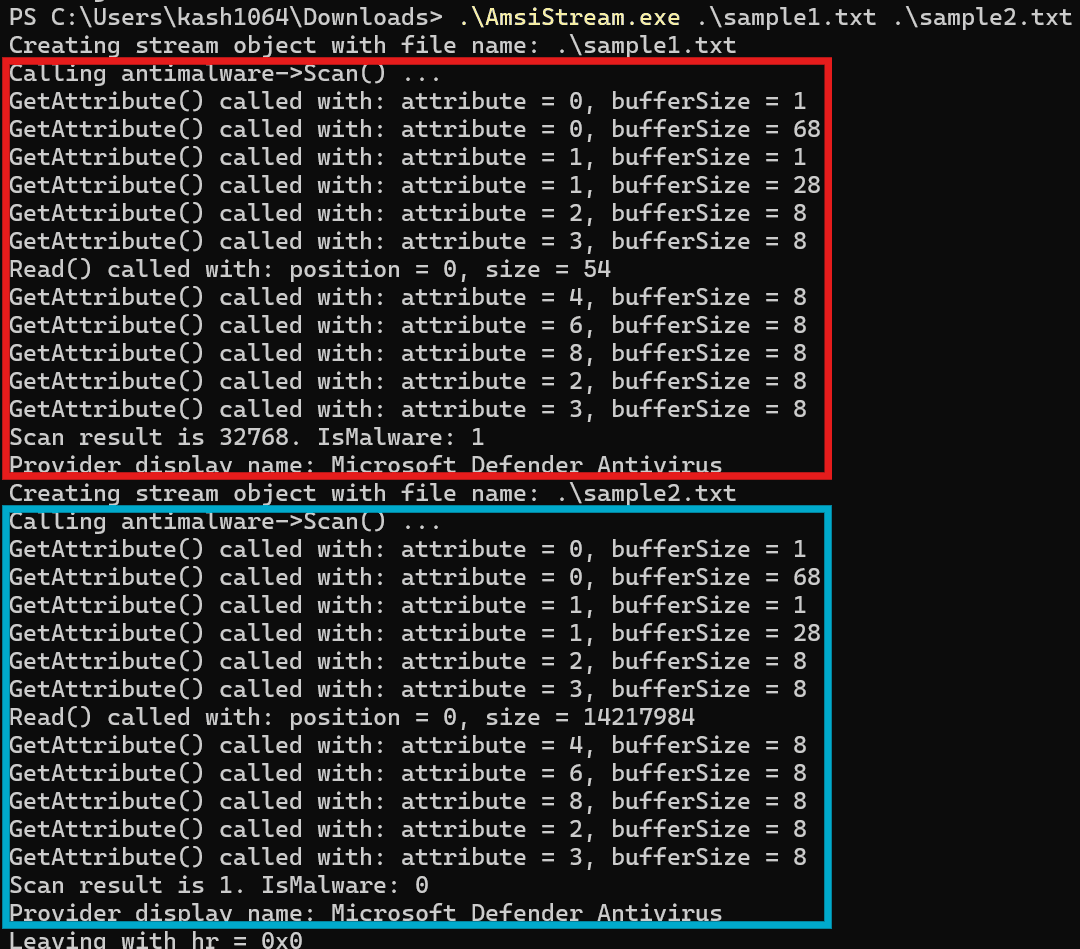
Below is the result of scanning sample1.txt (contains test string AMSI Test Sample:7e72c3ce-861b-4339-8740-0ac1484c1386)
and sample2.txt (contains harmless text) at the same time.
From the result, only sample1.txt, which contains the test detection string,
was judged as malware by AMSI scan.
Implementation of the AMSI client interface
Now that we confirmed AmsiStream behavior, we can go through implementation details.
The following steps simplify AmsiStream runtime behavior.
- Entry point
wmainis called and initializes viaCoInitializeEx. - If initialization succeeds,
ScanArgumentsis called with command-line arguments. ScanArgumentsfirst initializesCStreamScanner.- If file path arguments exist, initialize
CAmsiFileStream; otherwise initializeCAmsiMemoryStream. - Use
ScanStreamto scan file or memory content.
This chapter follows these steps in code.
Entry point implementation
The entry point wmain is implemented as a small function below.
int __cdecl wmain(_In_ int argc, _In_reads_(argc) WCHAR **argv)
{
  HRESULT hr = \
    CoInitializeEx(nullptr, COINIT_MULTITHREADED);

  if (SUCCEEDED(hr)) {
    hr = ScanArguments(argc, argv);
    CoUninitialize();
  }
  wprintf(L"Leaving with hr = 0x%x\n", hr);
  return 0;
}
It first calls CoInitializeEx to initialize the COM library.5
Then it calls ScanArguments with command-line arguments for class initialization and scan requests,
and finally releases resources with CoUninitialize.
ScanArguments function implementation
ScanArguments is called from wmain as follows.
HRESULT ScanArguments(_In_ int argc, _In_reads_(argc) wchar_t** argv)Inside this function, it first initializes scanner, an instance of CStreamScanner.
CStreamScanner defines ScanStream, which performs AMSI scanning through AMSI Scan
and displays the result.
CStreamScanner scanner;
HRESULT hr = scanner.Initialize();
if (FAILED(hr))
{
  return hr;
}
After scanner initialization,
ScanArguments chooses between CAmsiFileStream and CAmsiMemoryStream
based on whether file paths are present in command-line arguments.
If you run without arguments,
AmsiStream initializes CAmsiMemoryStream to scan memory content.
// Scan a single memory stream.
wprintf(L"Creating memory stream object\n");

ComPtr<IAmsiStream> stream;
hr = MakeAndInitialize<CAmsiMemoryStream>(&stream);
if (FAILED(hr)) {
   return hr;
}
This code initializes stream of CAmsiMemoryStream using MakeAndInitialize,
a function for initializing Windows runtime classes.6
After initialization, it performs the scan via scanner.ScanStream(stream.Get()).
hr = scanner.ScanStream(stream.Get());
if (FAILED(hr))
{
   return hr;
}
Because CAmsiMemoryStream was initialized as ComPtr<IAmsiStream> via MakeAndInitialize<CAmsiMemoryStream>(&stream),
stream.Get() calls Microsoft::WRL::ComPtr<IAmsiStream>::Get
and returns a pointer to the linked interface (IAmsiStream).7
The scan behavior executed by scanner.ScanStream() is explained in the CStreamScanner::ScanStream section.
Now back a little to the branch where file path arguments exist.
If AmsiStream is run with file path arguments,
ScanArguments initializes CAmsiFileStream instead of CAmsiMemoryStream.
When initializing CAmsiFileStream, the file path from command-line arguments is passed.
As with memory stream scanning,
stream.Get() provides an interface pointer for scanner.ScanStream().
// Scan the files passed on the command line.
for (int i = 1; i < argc; i++)
{
  LPWSTR fileName = argv[i];

  wprintf(L"Creating stream object with file name: %s\n",
          fileName
        );
  ComPtr<IAmsiStream> stream;
  hr = MakeAndInitialize<CAmsiFileStream>(&stream,
                                          fileName
                                         );
  if (FAILED(hr)) {
    return hr;
  }

  hr = scanner.ScanStream(stream.Get());
  if (FAILED(hr))
  {
    return hr;
  }
}
CStreamScanner class implementation
CStreamScanner is the class used to request AMSI scans in the sample.
It defines:
InitializeScanStream
Initialize is called as scanner.Initialize() in ScanArguments.
HRESULT Initialize()
{
  return CoCreateInstance(
    __uuidof(CAntimalware),
    nullptr,
    CLSCTX_INPROC_SERVER,
    IID_PPV_ARGS(&m_antimalware));
}
CoCreateInstance creates and initializes a class object linked to the specified CLSID.8
CAntimalware used in the arguments is a CLSID defined in amsi.h.
So this initialization enables AMSI scan requests from the sample.
The COM class matching this CLSID is in %windir%\system32\amsi.dll.
class DECLSPEC_UUID("fdb00e52-a214-4aa1-8fba-4357bb0072ec") CAntimalware;The interface pointer created by CoCreateInstance is stored in private member m_antimalware defined as ComPtr<IAntimalware> m_antimalware;.
This chapter does not go into detail for __uuidof and IID_PPV_ARGS,
but both are used to implement COM code more effectively.9
ScanStream, the other method in CStreamScanner,
receives an IAmsiStream object as stream,
calls IAntimalware::Scan, and performs an AMSI scan request.
HRESULT ScanStream(_In_ IAmsiStream* stream)
{
  wprintf(L"Calling antimalware->Scan() ...\n");

  ComPtr<IAntimalwareProvider> provider;
  AMSI_RESULT r;
  HRESULT hr = m_antimalware->Scan(stream, &r, &provider);
  if (FAILED(hr)) {
    return hr;
  }

  wprintf(L"Scan result is %u. IsMalware: %d\n",
           r,
           AmsiResultIsMalware(r)
         );

  if (provider) {
      PWSTR name;
      hr = provider->DisplayName(&name);
      if (SUCCEEDED(hr)) {
        wprintf(L"Provider display name: %s\n",
                 name
               );
        CoTaskMemFree(name);
      }
      else
      {
        wprintf(L"DisplayName failed with 0x%x", hr);
      }
  }

  return S_OK;
}
In this code, m_antimalware initialized by Initialize
is used to call Scan with stream.
ComPtr<IAntimalwareProvider> provider;
AMSI_RESULT r;
HRESULT hr = m_antimalware->Scan(stream, &r, &provider);
if (FAILED(hr)) {
  return hr;
}
IAntimalware::Scan takes these three arguments.10
HRESULT Scan(
  [in]  IAmsiStream          *stream,
  [out] AMSI_RESULT          *result,
  [out] IAntimalwareProvider **provider
);
The 1st argument is the IAmsiStream object stream.
The 2nd argument is the output address for the scan result (AMSI_RESULT).
The 3rd argument receives an IAntimalwareProvider object containing provider information.
After scan completion, ScanStream prints the result.
AmsiResultIsMalware determines whether content should be blocked from the scan result value.11
wprintf(L"Scan result is %u. IsMalware: %d\n",
         r,
         AmsiResultIsMalware(r)
       );
In amsi.h, it is defined with AMSI_RESULT as follows.
enum AMSI_RESULT
{
    AMSI_RESULT_CLEAN	= 0,
    AMSI_RESULT_NOT_DETECTED	= 1,
    AMSI_RESULT_BLOCKED_BY_ADMIN_START	= 0x4000,
    AMSI_RESULT_BLOCKED_BY_ADMIN_END	= 0x4fff,
    AMSI_RESULT_DETECTED	= 32768
} 	AMSI_RESULT;

#define AmsiResultIsMalware(r) ((r) >= AMSI_RESULT_DETECTED)
So it returns True when the result is AMSI_RESULT_DETECTED = 32768 or higher.
This means AMSI providers should return values of 32768 or higher
when scanned content is judged as malware.
How providers return scan results is explained in Chapter 3.
CAmsiStreamBase class implementation
CStreamScanner::ScanStream is called through methods in
CAmsiFileStream and CAmsiMemoryStream to scan file data or memory content.
Before those classes, this section explains their base class CAmsiStreamBase.
As described earlier, CAmsiStreamBase defines:
SetContentNameBaseGetAttributeCopyAttribute
SetContentName stores information such as file name.
HRESULT SetContentName(_In_ PCWSTR name)
{
    m_contentName = _wcsdup(name);
    return m_contentName ? S_OK : E_OUTOFMEMORY;
}
For example, when called from CAmsiFileStream,
SetContentName(fileName) is used.
When called from CAmsiMemoryStream,
SetContentName(L"Sample content.txt") is used with a hardcoded string.
Stored m_contentName is later returned by the client application
when the AMSI provider requests attribute AMSI_ATTRIBUTE_CONTENT_NAME.
BaseGetAttribute is used from IAmsiStream::GetAttribute,
which returns requested AMSI attributes in this sample.13
It receives requested AMSI attribute information and writes corresponding values into the output buffer.
HRESULT BaseGetAttribute(
  _In_ AMSI_ATTRIBUTE attribute,
  _In_ ULONG bufferSize,
  _Out_writes_bytes_to_(bufferSize, *actualSize) PBYTE buffer,
  _Out_ ULONG* actualSize)
  //
  // Return Values:
  //   S_OK: SUCCESS
  //   E_NOTIMPL: attribute not supported
  //   E_NOT_SUFFICIENT_BUFFER: need a larger buffer, required size in *retSize
  //   E_INVALIDARG: bad arguments
  //   E_NOT_VALID_STATE: object not initialized
  //
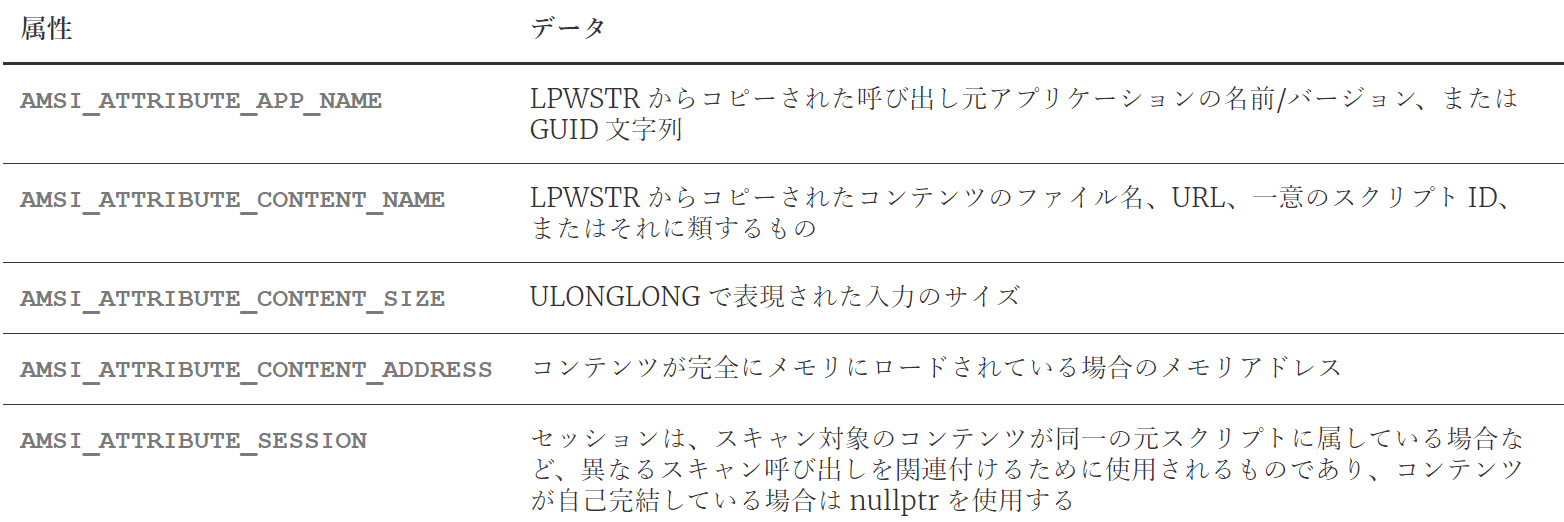
Attribute types used in AMSI scan are shown below.
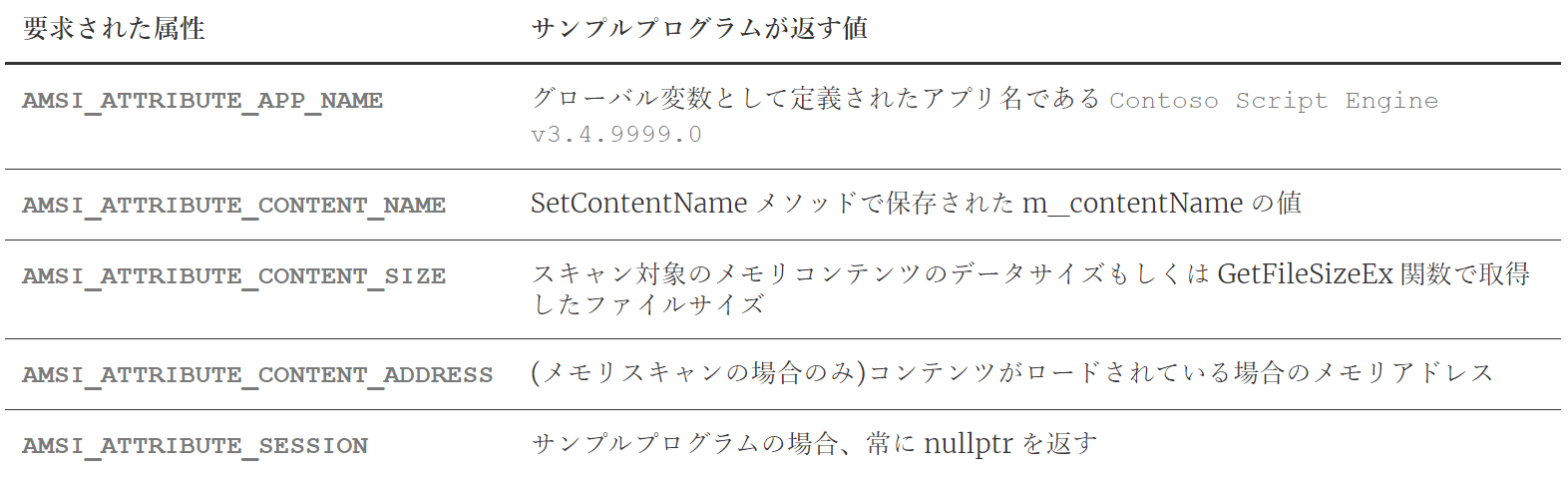
In this sample, the following values are returned for each attribute.
The code below writes each attribute in BaseGetAttribute.
AMSI_ATTRIBUTE_CONTENT_ADDRESS is used only for memory scans,
so it is defined in CAmsiMemoryStream::GetAttribute instead of BaseGetAttribute.
*actualSize = 0;

switch (attribute)
{
  case AMSI_ATTRIBUTE_CONTENT_SIZE:
    return CopyAttribute(&m_contentSize,
                          sizeof(m_contentSize),
                          bufferSize,
                          buffer,
                          actualSize
                        );

  case AMSI_ATTRIBUTE_CONTENT_NAME:
    return CopyAttribute(m_contentName,
                         (wcslen(m_contentName) + 1) \
                                       * sizeof(WCHAR),
                         bufferSize, buffer,
                         actualSize
                        );

  case AMSI_ATTRIBUTE_APP_NAME:
    return CopyAttribute(AppName,
                         sizeof(AppName),
                         bufferSize,
                         buffer,
                         actualSize
                        );

  case AMSI_ATTRIBUTE_SESSION:
    // no session for file stream
    constexpr HAMSISESSION session = nullptr;
    return CopyAttribute(&session,
                          sizeof(session),
                          bufferSize,
                          buffer,
                          actualSize
                        );
}

return E_NOTIMPL; // unsupported attribute
As seen above, actual buffer writing is performed by CopyAttribute.
CopyAttribute is simple: it checks buffer size and writes with memcpy_s.14
HRESULT CopyAttribute(
  _In_ const void* resultData,
  _In_ size_t resultSize,
  _In_ ULONG bufferSize,
  _Out_writes_bytes_to_(bufferSize, *actualSize) \
                                          PBYTE buffer,
  _Out_ ULONG* actualSize)
{
  *actualSize = (ULONG)resultSize;
  if (bufferSize < resultSize)
  {
    return E_NOT_SUFFICIENT_BUFFER;
  }
  memcpy_s(buffer, bufferSize, resultData, resultSize);
  return S_OK;
}
CAmsiMemoryStream class implementation
CAmsiMemoryStream is used for memory content scanning.
In AMSI, this class is used as an IAmsiStream implementation
for retrieving attributes and scan content.15
It inherits CAmsiStreamBase.
class CAmsiMemoryStream : public RuntimeClass<RuntimeClassFlags<ClassicCom>, IAmsiStream>, CAmsiStreamBaseAs an IAmsiStream implementation, it defines two methods:
GetAttribute and Read.
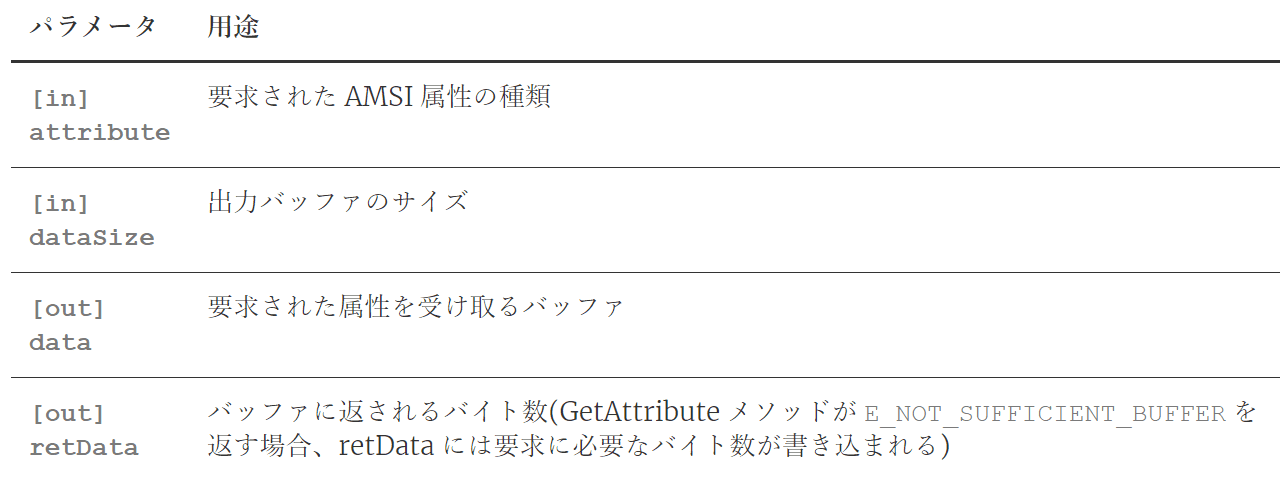
IAmsiStream::GetAttribute is defined to return values corresponding to requested AMSI attributes.16
Parameter details are shown below.
In CAmsiMemoryStream, this method is implemented as follows.
Requests for attributes other than AMSI_ATTRIBUTE_CONTENT_ADDRESS
are delegated to base method BaseGetAttribute.
When requested attribute is AMSI_ATTRIBUTE_CONTENT_ADDRESS,
it returns the address of the scan target string defined as global constant SampleStream.
STDMETHOD(GetAttribute)(
  _In_ AMSI_ATTRIBUTE attribute,
  _In_ ULONG bufferSize,
  _Out_writes_bytes_to_(bufferSize, *actualSize) \
                                        PBYTE buffer,
  _Out_ ULONG* actualSize)
{
  HRESULT hr = BaseGetAttribute(attribute,
                                bufferSize,
                                buffer,
                                actualSize
                              );
  if (hr == E_NOTIMPL)
  {
    switch (attribute)
    {
    case AMSI_ATTRIBUTE_CONTENT_ADDRESS:
      const void* contentAddress = SampleStream;
      hr = CopyAttribute(&contentAddress,
                          sizeof(contentAddress),
                          bufferSize,
                          buffer,
                          actualSize
                        );
    }
  }
  return hr;
}
Now Read.
IAmsiStream::Read is defined to return scan target content until the received buffer is full.17
Parameter details are shown below.
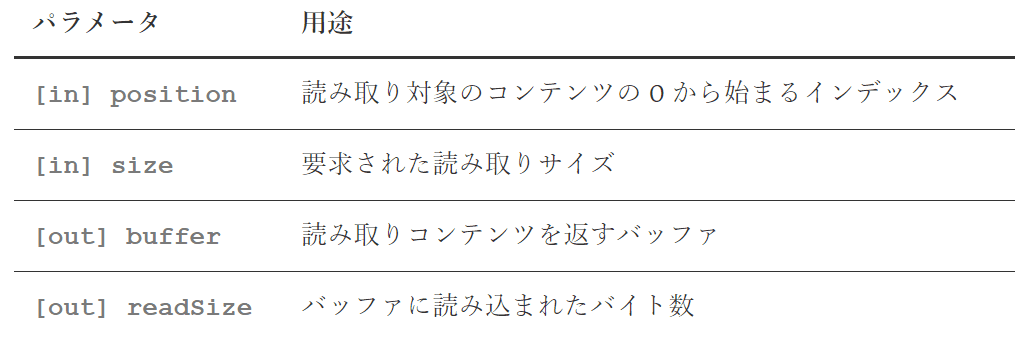
Actual implementation in CAmsiMemoryStream:
STDMETHOD(Read)(
    _In_ ULONGLONG position,
    _In_ ULONG size,
    _Out_writes_bytes_to_(size, *readSize) PBYTE buffer,
    _Out_ ULONG* readSize)
{
  wprintf(L"Read() called with: position = %I64u, size = %u\n",
          position,
          size
        );

  *readSize = 0;
  if (position >= m_contentSize)
  {
    wprintf(L"Reading beyond end of stream\n");
    return HRESULT_FROM_WIN32(ERROR_HANDLE_EOF);
  }

  if (size > m_contentSize - position) {
    size = static_cast<ULONG>(m_contentSize - position);
  }

  *readSize = size;
  memcpy_s(buffer, size, SampleStream + position, size);
  return S_OK;
}
As shown, this meets IAmsiStream::Read requirements
by copying scan target string (SampleStream) into the buffer with memcpy_s.
CAmsiFileStream class implementation
Finally, implementation of CAmsiFileStream, used to scan file content with AMSI.
class CAmsiFileStream : public RuntimeClass<RuntimeClassFlags<ClassicCom>, IAmsiStream>, CAmsiStreamBaseLike CAmsiMemoryStream, this class is also an IAmsiStream implementation.
During initialization, file path string fileName is first copied to m_contentName
through base method SetContentName.
HRESULT hr = S_OK;
hr = SetContentName(fileName);
if (FAILED(hr))
{
  return hr;
}
Then CreateFileW creates a read access handle for the target file,
which is attached to private member m_fileHandle.
m_fileHandle is a FileHandleTraits object from WRL used for safe file handle management.
m_fileHandle.Attach(
  CreateFileW(
    fileName,
    GENERIC_READ,         // dwDesiredAccess
    0,                    // dwShareMode
    nullptr,              // lpSecurityAttributes
    OPEN_EXISTING,        // dwCreationDisposition
    FILE_ATTRIBUTE_NORMAL,// dwFlagsAndAttributes
    nullptr
  )
);                        // hTemplateFile
After getting the handle,
GetFileSizeEx gets target file size and stores it in m_contentSize (ULONGLONG).
This is because AMSI_ATTRIBUTE_CONTENT_SIZE is defined as ULONGLONG.
LARGE_INTEGER fileSize;
if (!GetFileSizeEx(m_fileHandle.Get(), &fileSize))
{
  hr = HRESULT_FROM_WIN32(GetLastError());
  wprintf(L"GetFileSizeEx failed with 0x%x\n", hr);
  return hr;
}

m_contentSize = (ULONGLONG)fileSize.QuadPart;
Now CAmsiFileStream::GetAttribute.
Unlike CAmsiMemoryStream, it is fully delegated to BaseGetAttribute.
STDMETHOD(GetAttribute)(
      _In_ AMSI_ATTRIBUTE attribute,
_In_ ULONG bufferSize,
_Out_writes_bytes_to_(bufferSize, *actualSize) PBYTE buffer,
_Out_ ULONG* actualSize)
{
  return BaseGetAttribute(attribute, bufferSize, buffer, actualSize);
}
Finally, CAmsiFileStream::Read.
Like memory stream, this is an IAmsiStream::Read implementation
that must return scan content until buffer is full.
OVERLAPPED o = {};
o.Offset = LODWORD(position);
o.OffsetHigh = HIDWORD(position);

if (!ReadFile(m_fileHandle.Get(),
              buffer,
              size,
              readSize,
              &o
            )
    )
{
  HRESULT hr = HRESULT_FROM_WIN32(GetLastError());
  wprintf(L"ReadFile failed with 0x%x\n", hr);
  return hr;
}
The key difference from memory stream is that data is read from target file via ReadFile
into the output buffer.
Chapter 2 Summary
This chapter explained how sample program AmsiStream uses AMSI to request scans for memory content and file content.
From this implementation, to integrate AMSI in a client application, you mainly need to implement:
- Define an
IAmsiStreamobject and implementGetAttributeandReadto return AMSI attributes and scan content. - Create the COM class object (
IAntimalware) defined inamsi.dll, and callScanto request AMSI scan. - Handle scan results (
AMSI_RESULT) for operations such as content blocking.
In Chapter 3, I explain how AMSI providers registered on the system
retrieve and scan content after IAntimalware::Scan is called.
Book table of contents
- Foreword
- Chapter 1: About AMSI (Windows Antimalware Scan Interface)
- Chapter 2: AMSI Client Interface
- Chapter 3: AMSI Provider
- Chapter 4: Customizing the Sample Programs
- Chapter 5: AMSI Integrated into PowerShell
-
RuntimeClass Class https://learn.microsoft.com/ja-jp/cpp/cppcx/wrl/runtimeclass-class
↩ -
IAmsiStream interface https://learn.microsoft.com/ja-jp/windows/win32/api/amsi/nn-amsi-iamsistream
↩ -
Encoding.Unicode Property https://learn.microsoft.com/ja-jp/dotnet/api/system.text.encoding.unicode
↩ -
EventRecord Class https://learn.microsoft.com/ja-jp/dotnet/api/system.diagnostics.eventing.reader.eventrecord
↩ -
CoInitializeEx function https://learn.microsoft.com/ja-jp/windows/win32/api/combaseapi/nf-combaseapi-coinitializeex
↩ -
MakeAndInitialize Function https://learn.microsoft.com/ja-jp/cpp/cppcx/wrl/makeandinitialize-function
↩ -
ComPtr Class https://learn.microsoft.com/ja-jp/cpp/cppcx/wrl/comptr-class
↩ -
CoCreateInstance function https://learn.microsoft.com/ja-jp/windows/win32/api/combaseapi/nf-combaseapi-cocreateinstance
↩ -
COM Coding Practices https://learn.microsoft.com/ja-jp/windows/win32/learnwin32/com-coding-practices
↩ -
IAntimalware::Scan method https://learn.microsoft.com/ja-jp/windows/win32/api/amsi/nf-amsi-iantimalware-scan
↩ -
AmsiResultIsMalware macro https://learn.microsoft.com/en-us/windows/win32/api/amsi/nf-amsi-amsiresultismalware
↩ -
AMSIRESULT enumeration [https://learn.microsoft.com/ja-jp/windows/win32/api/amsi/ne-amsi-amsiresult](https://learn.microsoft.com/ja-jp/windows/win32/api/amsi/ne-amsi-amsi_result)
↩ -
IAmsiStream::GetAttribute method https://learn.microsoft.com/ja-jp/windows/win32/api/amsi/nf-amsi-iamsistream-getattribute
↩ -
memcpy_s https://learn.microsoft.com/ja-jp/cpp/c-runtime-library/reference/memcpy-s-wmemcpy-s
↩ -
IAmsiStream interface https://learn.microsoft.com/ja-jp/windows/win32/api/amsi/nn-amsi-iamsistream
↩ -
IAmsiStream::GetAttribute method https://learn.microsoft.com/ja-jp/windows/win32/api/amsi/nf-amsi-iamsistream-getattribute
↩ -
IAmsiStream::Read method https://learn.microsoft.com/ja-jp/windows/win32/api/amsi/nf-amsi-iamsistream-read
↩