This page has been machine-translated from the original page.
This chapter performs surface analysis of DoPClient and DoPDriver, the programs analyzed in this book.
Surface analysis generally refers to analysis methods that use information such as program metadata and strings contained in a file to understand the overall nature of the target.
For example, when you perform surface analysis on Windows executables, you can identify the following kinds of information.
- Information about the type of executable file
- Configuration information contained in the executable header
- Information about DLLs loaded by the executable and the Windows APIs it uses
- Information about strings defined inside the executable
Table of Contents
Identify the File Type
The type of the target file can be identified through surface analysis.
On Linux, commands such as file, which are installed on many distributions, can easily identify the type of a target file.
On Windows, by contrast, it is common to use third-party tools to examine file types.
This book does not cover file-type investigation tools in detail, but TrID 1 is one commonly used option.
TrID is also provided as an online tool, so it is convenient when it is acceptable to upload the file being analyzed to an external site, as in this case.
Online TrID File Identifier:
https://mark0.net/onlinetrid.html
When the executables analyzed in this book are checked with the online tool above, they are identified as likely 64-bit Windows executables, as shown below.
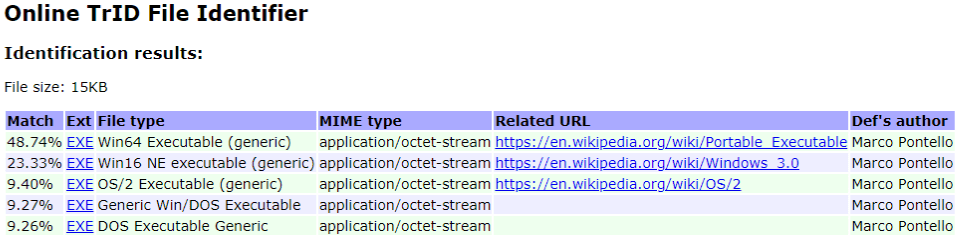
Note: Uploading files that are not publicly available to Internet-based analysis sites can become a serious security incident, so please use such sites with great care.
Examine PE File Information
Windows executables are normally created in the PE file format 2.
PE file headers contain a wide variety of information about the executable.
This book does not explain PE file headers in detail, but in general you can inspect the following kinds of information from a PE header.
- Information about functions and data exported by the executable
- Information about library functions and data imported by the executable
- Debug information for the executable
In addition, by analyzing data inside the executable, you can inspect the following kinds of information as well.
- Data such as strings embedded in the executable
- Data that may be encrypted or obfuscated inside the executable
Now let’s actually try some surface analysis on DoPClient and DoPDriver.
There are several tools that can be used for surface analysis of Windows programs, but in this book we use the free edition of PEStudio 3.
There are also several useful tools for surface analysis of Windows programs besides PEStudio.
This book does not use them, but CFF Explorer included in Explorer Suite 4 and PE Bear are also extremely useful tools.
When you analyze DoPClient and DoPDriver with PE Studio, a wide range of information is displayed at once, as shown in the image below.
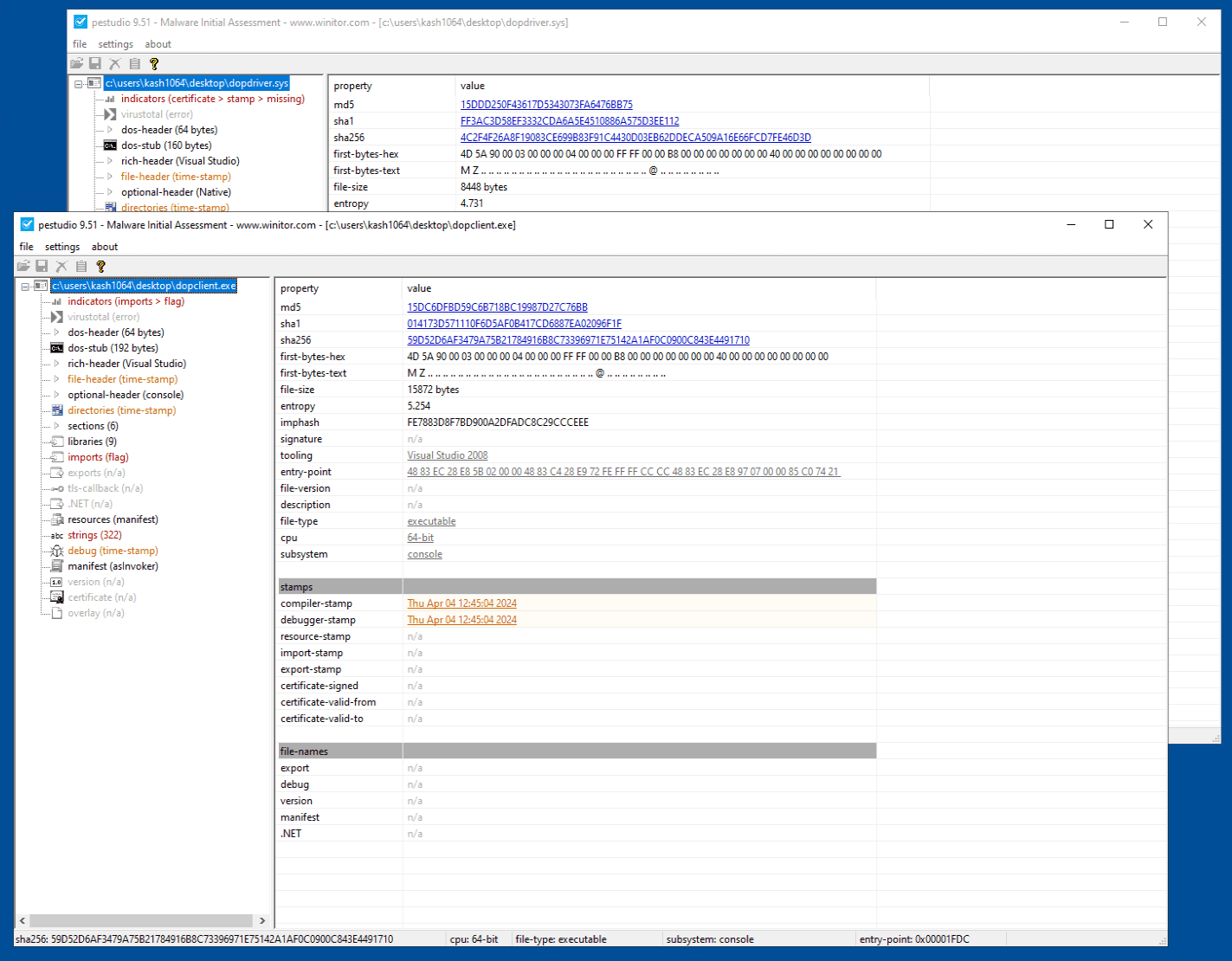
From here, you can inspect information such as hashes and timestamps for the target files.
You can also inspect the strings embedded in DoPClient by opening the [strings] tab for DoPClient.
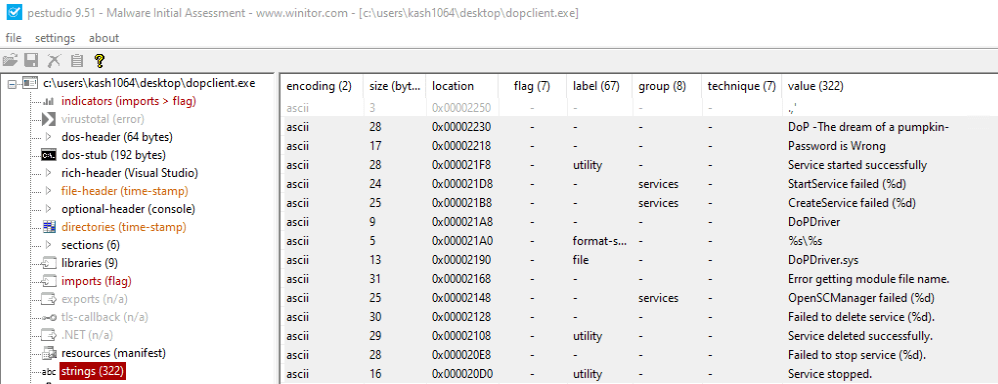
From strings such as Password is Wrong, DoPDriver.sys, and StartService failed (%d), we can infer that this program may validate a password and load or start DoPDriver.sys.
Furthermore, the [imports] tab of DoPClient confirms that the target program imports API functions such as OpenSCManager and CreateService.
Next, let’s look at the analysis results for DoPDriver.
In DoPDriver, it appears that the developer forgot to remove information about the debug information file (the PDB file), and we can see that the debug area of the Data Directory section in the PE file contains the file path C:\Users\kash1064\Documents\DoP\x64\Release\DoPDriver.pdb, which includes a user name.
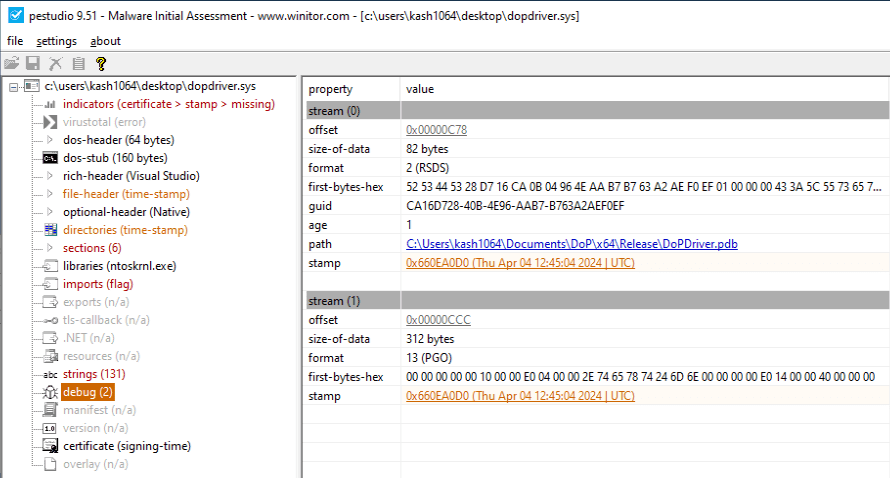
And from the [strings] tab of DoPDriver, we can confirm that the string FLAG{The_important_process_is_ is defined.
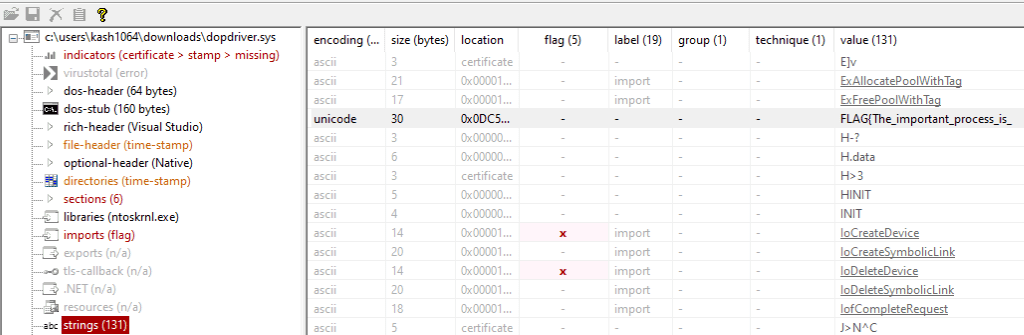
This looks like the first half of the correct Flag, and it seems likely to become an important keyword as we continue the analysis.
Summary of Chapter 2
In this chapter, we used PEStudio to perform surface analysis of DoPClient and DoPDriver, the programs targeted in this book.
Although it did not appear in this chapter, surface analysis can sometimes reveal even more information, such as sensitive data embedded as text or data that may be encrypted or obfuscated.
For various techniques related to surface analysis of Windows programs, “リバースエンジニアリングツール Ghidra 実践ガイド” 6 and “Practical Malware Analysis” 7 are extremely helpful references.
Links to Each Chapter
- Preface
- Chapter 1: Environment Setup
- Chapter 2: Surface Analysis of DoPClient and DoPDriver
- Chapter 3: Static Analysis of DoPClient
- Chapter 4: Dynamic Analysis of DoPClient
- Chapter 5: Static Analysis of DoPDriver
- Chapter 6: Dynamic Analysis of DoPDriver
-
TrID - File Identifier https://mark0.net/soft-trid-e.html
↩ -
PE Format https://learn.microsoft.com/ja-jp/windows/win32/debug/pe-format
↩ -
PEStudio https://www.winitor.com/download
↩ -
Explorer Suite https://ntcore.com/explorer-suite/
↩ -
PE Bear https://github.com/hasherezade/pe-bear
↩ -
リバースエンジニアリングツール Ghidra 実践ガイド セキュリティコンテスト入門からマルウェア解析まで (中島 将太, 小竹 泰一, 原 弘明, 川畑 公平 著 / マイナビ出版 / 2020 年)
↩ -
Practical Malware Analysis: The Hands-On Guide to Dissecting Malicious Software (Michael Sikorski, Andrew Honig 著 / No Starch Press / 2012 年)
↩