This page has been machine-translated from the original page.
In this chapter, we gather the information needed to identify the Flag by statically analyzing DoPClient.
Static analysis is a method of analyzing a program without actually executing it.
Depending on the definition, the investigation of file metadata and similar information performed in Chapter 2 can also be classified as static analysis, but in this book I use the term static analysis to refer to disassembling the program and analyzing it in detail.
This book uses Binary Ninja as the tool for disassembly.
If you are more comfortable with another tool such as IDA or Ghidra, feel free to use that instead.
Table of Contents
- Disassemble DoPClient with Binary Ninja
- Rename Functions
- Read Conditional Branches
- Read Loops
- Validate the Input String
- Load the Kernel Driver
- Access the Driver Object
- Summary of Chapter 3
- Links to Each Chapter
Disassemble DoPClient with Binary Ninja
First, use Binary Ninja to disassemble DoPClient.
Disassembly is a method of reconstructing a program expressed in machine language into human-readable source code (assembly).
Today, when humans create programs, they almost never type machine language consisting directly of 0s and 1s to create an executable.
Normally, people save source code written in C, assembly language, or a similar language to a file, and then use a compiler and linker to build a machine-language file that a computer can execute.
The method of converting a program built in this way back into source code so that humans can read it again is called disassembly.
When a compiler or linker builds a program, it applies optimizations such as improving the efficiency of the executable code and removing comments.
For that reason, note that the code you can recover by disassembling a built program does not exactly match the original source code.
This book does not cover the detailed steps for building an executable program from C source code or the basic methods and algorithms of disassembly, but those topics are explained in detail in “実践バイナリ解析 バイナリ計装、解析、逆アセンブリのためのLinuxツールの作り方” 1, which is a useful reference.
Disassembling with Binary Ninja is extremely easy: just launch the installed Binary Ninja and drag and drop the executable you want to analyze.
When you load DoPClient.exe into Binary Ninja, the following screen appears.
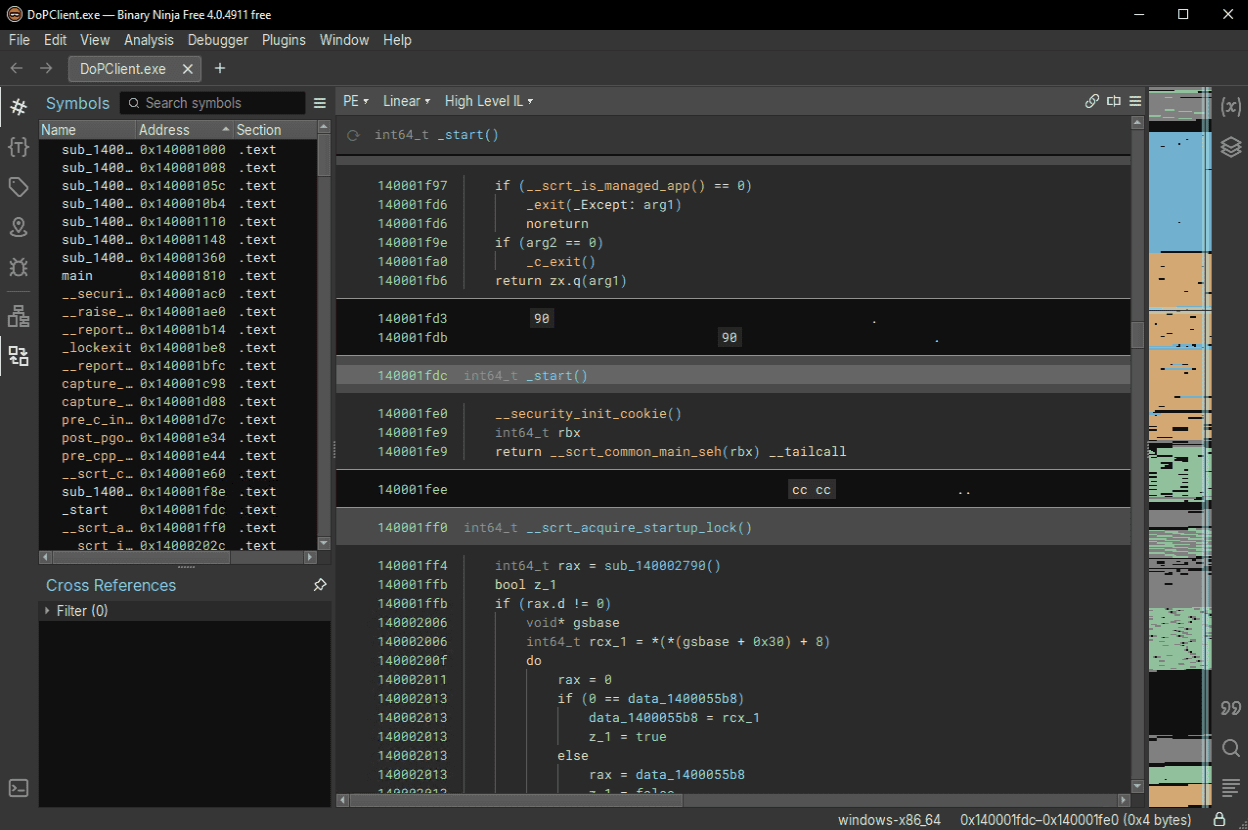
To display the disassembly result for DoPClient, change the display mode in the pull-down menu in the center of the screen from [High Level IL] to [Disassembly].
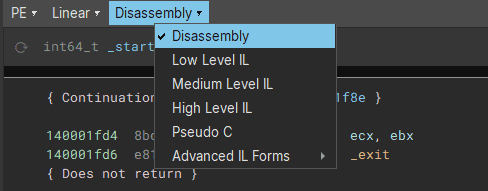
Now the analysis result displayed in the view has become disassembled assembly code.
Next, identify the address of the program’s main function and inspect its disassembly.
Find the main function in the [Symbols] window on the left side of the screen and double-click it to inspect the disassembly result for main.
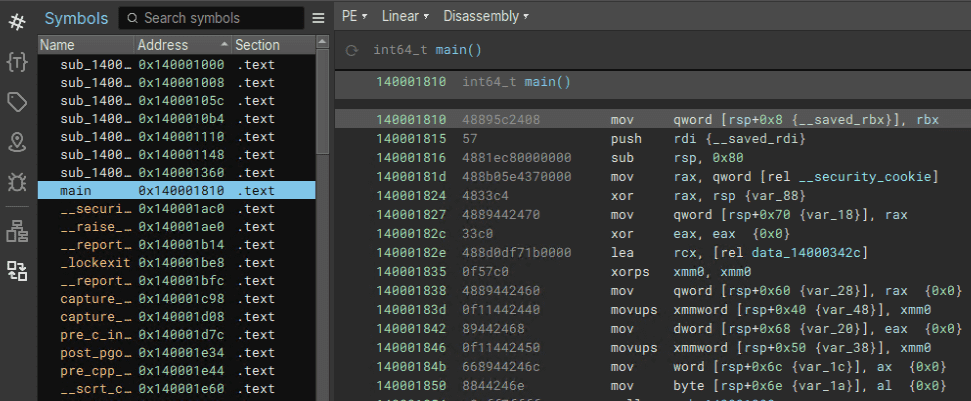
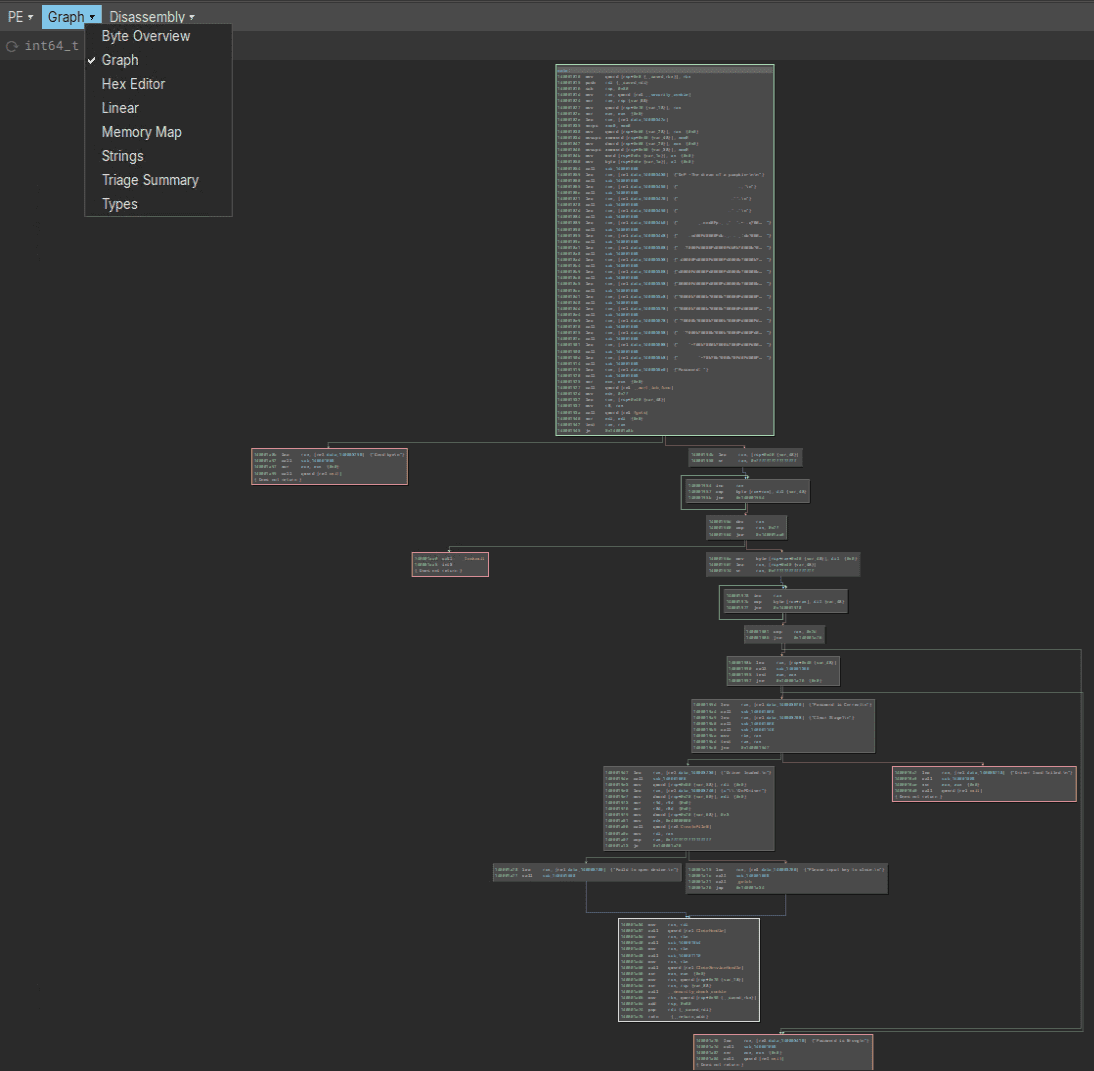
Finally, change the display mode from Linear mode to Graph mode so that the program’s branches and other control flow are easier to follow.
By changing the display mode in the pull-down menu in the center of the screen from [Linear] to [Graph], you can inspect the disassembly result of the main function in Graph view.
Rename Functions
If you start reading the disassembly of the main function from the beginning, you can see that the sub_140001008 function is called repeatedly near the start.
Immediately before the call to sub_140001008, a string is loaded from the .data section into the RCX register.
The information in the [Cross Reference] window on the left side also shows that sub_140001008 is being executed with some kind of message text as its argument.
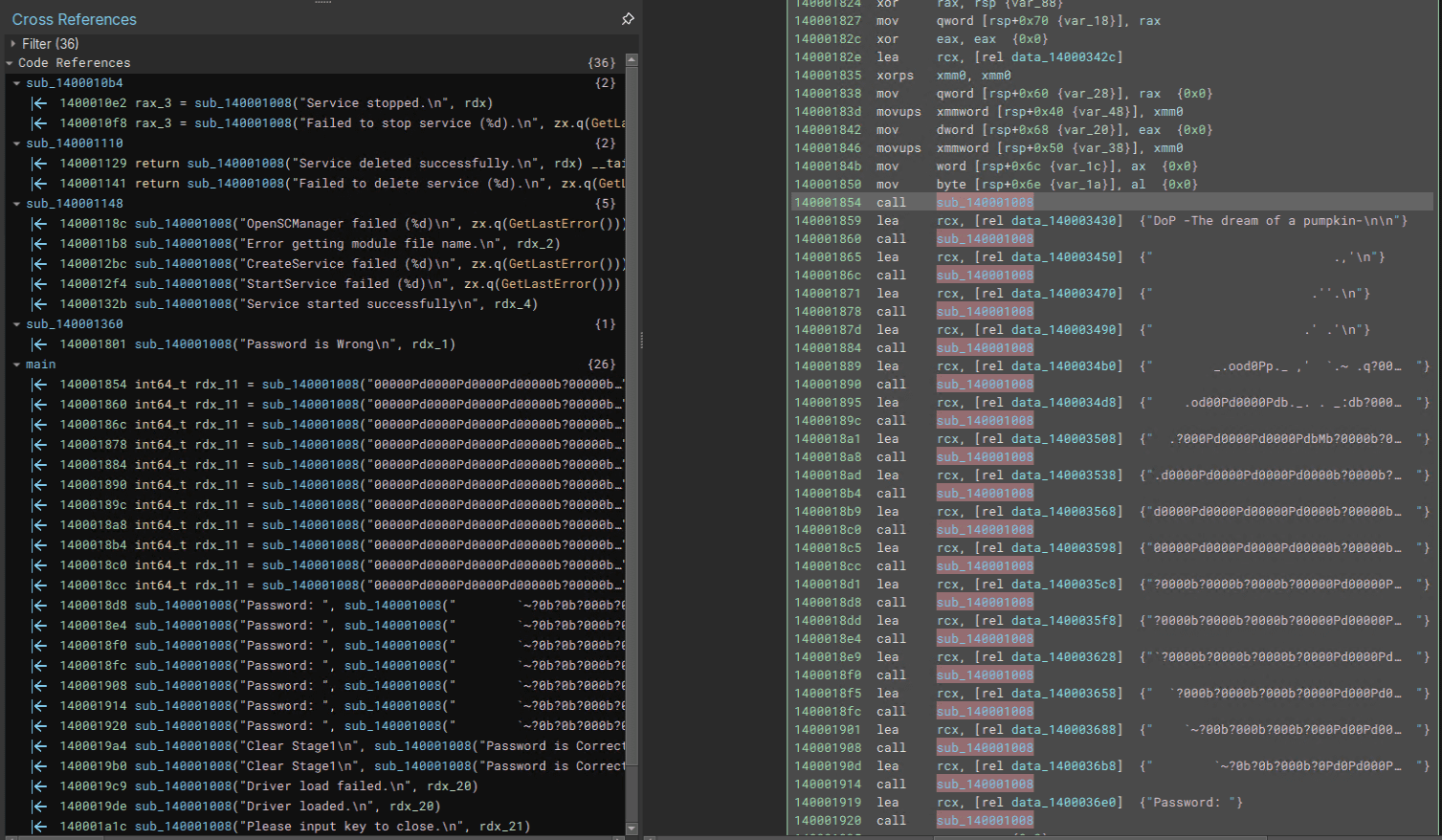
From this, we can predict that sub_140001008 is likely a function similar to printf.
In fact, if you double-click sub_140001008 and jump to its address, you can see that __stdio_common_vfprintf is called within the function.
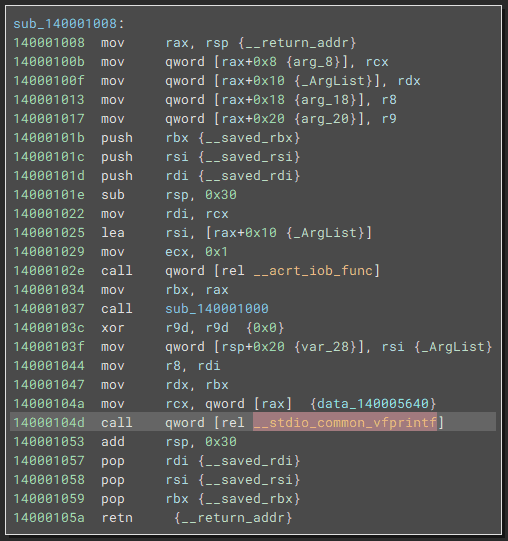
There is not much detailed information about __stdio_common_vfprintf, but judging from its name, it seems likely to be related to the CRT library and to the vprintf function that corresponds to printf.
vprintf function:
https://learn.microsoft.com/ja-jp/cpp/c-runtime-library/vprintf-functions?view=msvc-170
You can also confirm that if you actually build C source code containing the library function printf in Visual Studio, processing similar to the sub_140001008 function is called.
This also suggests that sub_140001008 is the printf function and is very likely responsible for outputting the string stored in RCX.
So, in Binary Ninja, right-click the sub_140001008 function, choose [Rename Symbol], and rename it to printf.
Once you do this, sub_140001008 is replaced with printf in the Binary Ninja UI, making the disassembly result easier to analyze.
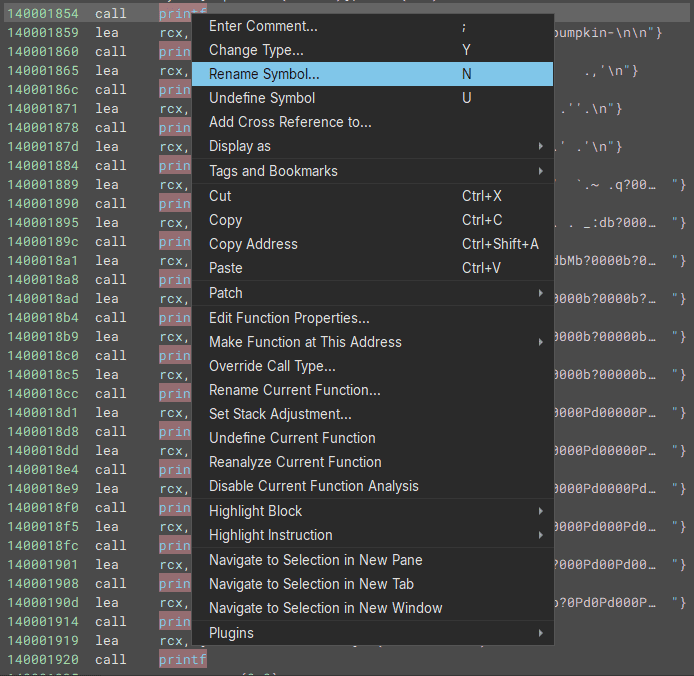
When analyzing a file that has no symbols, analysis becomes smoother if you rename functions and variables in the tool as you work.
Read Conditional Branches
Now that the code has become easier to read after renaming the printf function, let’s continue reading the code near the beginning.
The assembly code from the start of the main function up to the first conditional branch at 0x140001945 is shown below.
main:
mov     qword [rsp+0x8 {__saved_rbx}], rbx
push    rdi {__saved_rdi}
sub     rsp, 0x80
mov     rax, qword [rel __security_cookie]
xor     rax, rsp {var_88}
mov     qword [rsp+0x70 {var_18}], rax
xor     eax, eax  {0x0}
lea     rcx, [rel data_14000342c]
xorps   xmm0, xmm0
mov     qword [rsp+0x60 {var_28}], rax  {0x0}
movups  xmmword [rsp+0x40 {var_48}], xmm0
mov     dword [rsp+0x68 {var_20}], eax  {0x0}
movups  xmmword [rsp+0x50 {var_38}], xmm0
mov     word [rsp+0x6c {var_1c}], ax  {0x0}
mov     byte [rsp+0x6e {var_1a}], al  {0x0}
call    printf
lea     rcx, [rel data_140003430]  {"DoP -The dream of a pumpkin-\n\n"}
call    printf
{中略}
lea     rcx, [rel data_1400036e0]  {"Password: "}
call    printf
xor     ecx, ecx  {0x0}
call    qword [rel __acrt_iob_func]
mov     edx, 0x2f
lea     rcx, [rsp+0x40 {var_48}]
mov     r8, rax
call    qword [rel fgets]
xor     edi, edi  {0x0}
test    rax, rax
je      0x140001a8b
First, the earlier part is just the function prologue and processing that outputs the program title and ASCII art, so we can ignore it.
What we want to focus on in the later code is the processing from lea rcx, [rel data_1400036e0] {"Password: "} at 0x140001919 through je 0x140001a8b at 0x140001945.
Here, we can see that after outputting the string Password:, the program waits for input and uses the fgets function to receive 47 (0x2f) bytes from standard input.
The string received by fgets is written to the address of the stack area loaded into RCX by lea rcx, [rsp+0x40 {var_48}].
After that, the following conditional branch is implemented by using the RAX register, which stores the return value of the fgets function.
test    rax, rax
je      0x140001a8b
This is assembly code that appears frequently when code containing an if-else conditional branch is compiled.
These two lines compare whether the value of RAX is 0; if RAX is 0, execution jumps to the address pointed to by je.2
First, the test instruction performs an AND operation on its two operands and rewrites the flag register based on the result.
When the instruction test rax, rax is executed, if RAX is 0 then the zero flag (ZF) in the flag register becomes 1; otherwise it becomes 0.
The following je is an instruction that jumps to the specified address when the zero flag (ZF) is 1, so in this case the branch means that if the return value of the fgets function is 0 (= if receiving input with fgets failed), execution moves to the instruction at 0x140001a8b.
With that in mind, let’s take a look at Binary Ninja’s Graph view.
If execution jumps to the instruction at 0x140001a8b through this conditional branch, the string Good Bye is printed and the program then terminates via the exit function.
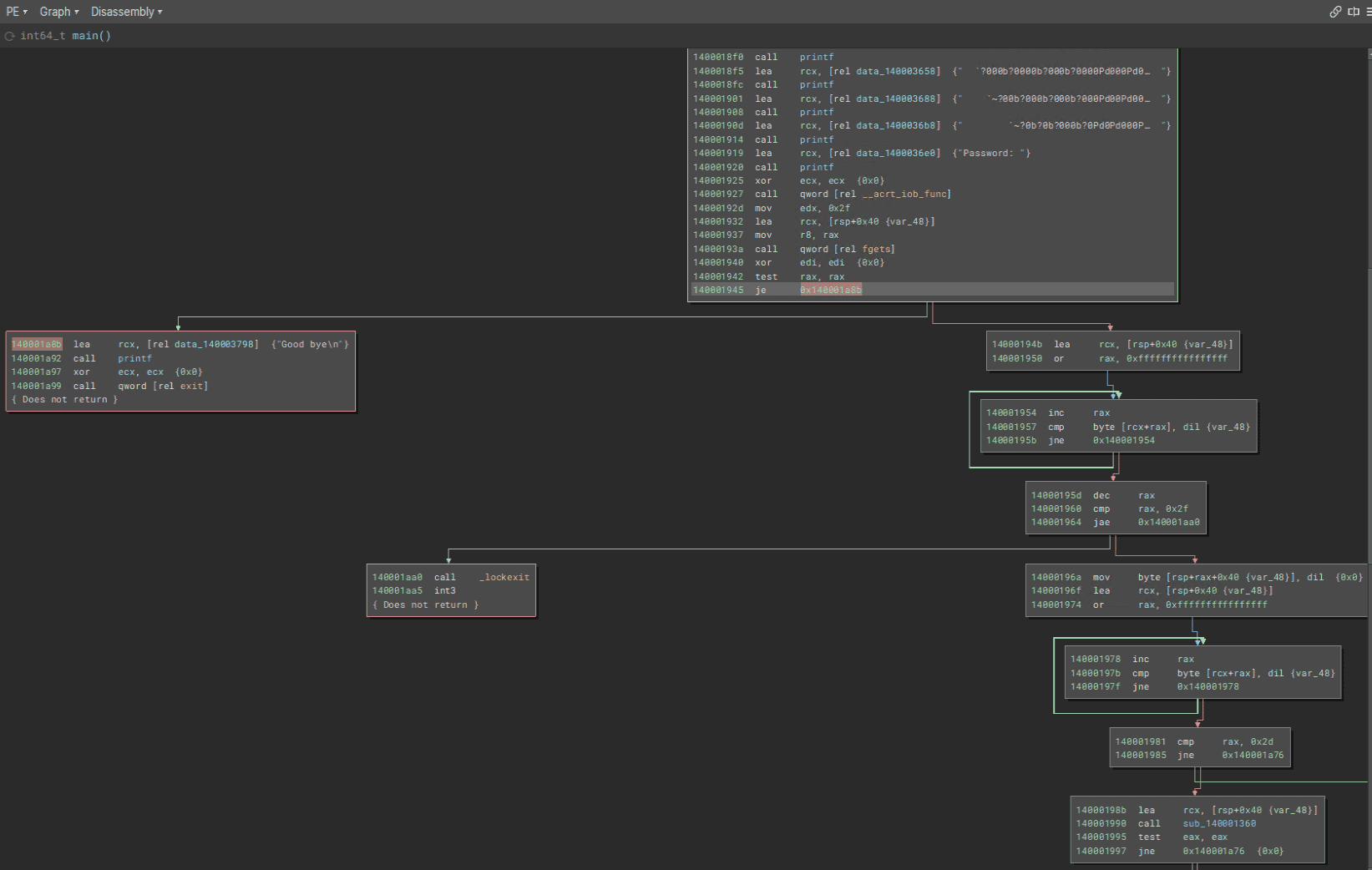
In other words, we have learned that this conditional branch checks whether receiving input with fgets succeeded, and terminates the program if it failed.
When analyzing program behavior, one important point is to focus on conditional branches and on the behavior before and after them, and to investigate what operations cause what processing to be executed.
Read Loops
Next, let’s read the processing that runs after fgets successfully receives the input value, in other words the code from 0x14000194b onward.
Binary Ninja’s Graph view is shown below.
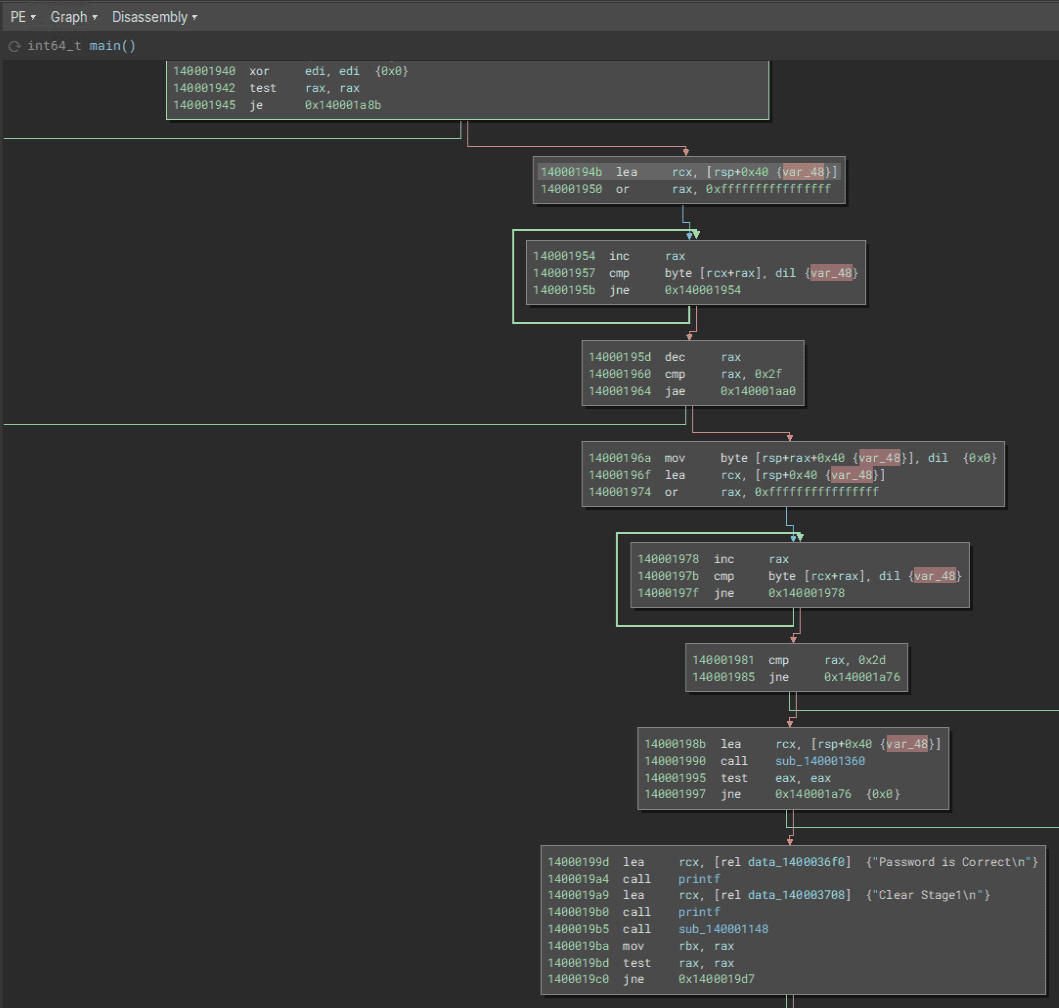
First, at 0x14000194b, lea rcx, [rsp+0x40 {var_48}] stores the address RSP+0x40 in the RCX register.
As we already confirmed, the stack area pointed to by the address RSP+0x40 stores the input value received by the fgets function.
For that reason, analysis will probably go more smoothly if you rename the local variable var_48 to something like inputText.
The following instructions execute the first loop in this function.
14000194b  lea     rcx, [rsp+0x40 {inputText}]
140001950  or      rax, 0xffffffffffffffff

// 以下、ループ処理
140001954  inc     rax
140001957  cmp     byte [rcx+rax], dil {inputText}
14000195b  jne     0x140001954
This assembly code may look a little tricky, but the following loop processing is taking place here.
- First, the loop counter effectively starts at 0. (By replacing RAX with
0xffffffffffffffffusing an OR operation and then incrementing it once, the value used when the loop begins becomes 0.) - Next, the
cmpinstruction compares whether the value atRCX+RAX, in other wordsinputText[i], matches the value in dil (NULL here). - If
inputText[i]does not match the value in dil, execution jumps to 0x140001954 and increments the value in the RAX register.
In this loop, RAX continues to be incremented until inputText[i] becomes a NULL character.
In other words, after this loop finishes, RAX will contain a value equal to “the size of the input received by fgets + 1.”
Now that we can read the code up to this point, let’s look once again at the assembly code including the processing that follows.
14000194b  lea     rcx, [rsp+0x40 {inputText}]
140001950  or      rax, 0xffffffffffffffff

// ループ処理の開始
140001954  inc     rax
140001957  cmp     byte [rcx+rax], dil {inputText}
14000195b  jne     0x140001954

RAX には「fgets 関数で受け取った入力値のサイズ + 1」分の値が格納されている
14000195d  dec     rax
140001960  cmp     rax, 0x2f
140001964  jae     0x140001aa0

14000196a  mov     byte [rsp+rax+0x40 {inputText}], dil  {0x0}
Once you understand that the processing from 0x140001954 to 0x14000195b keeps incrementing RAX until it becomes a value equal to “the size of the input received by fgets + 1,” it should also make sense that this sequence can be expressed as the following simple code.
inputText[strlen(inputText) - 1] = 0;This code replaces the last one byte of the input received by fgets with a NULL character.
In other words, it removes the newline character from the input received by fgets.
Incidentally, if you change Binary Ninja’s analysis mode to Decompile (Pseudo C), this sequence of code is replaced by the following pseudocode containing a loop.
 do
 {
     i = (i + 1);
 } while (*(uint8_t*)(&inputText + i) != 0);
 if ((i - 1) >= 0x2f)
 {
     _lockexit();
     breakpoint();
 }
 *(uint8_t*)(&inputText + (i - 1)) = 0;
You can also see that a similar structure appears in the code executed immediately afterward, from 0x14000196a to 0x140001985.
14000196a  mov     byte [rsp+rax+0x40 {inputText}], dil  {0x0}
14000196f  lea     rcx, [rsp+0x40 {inputText}]
140001974  or      rax, 0xffffffffffffffff

140001978  inc     rax
14000197b  cmp     byte [rcx+rax], dil {inputText}
14000197f  jne     0x140001978

140001981  cmp     rax, 0x2d
140001985  jne     0x140001a76

14000198b  lea     rcx, [rsp+0x40 {inputText}]
140001990  call    sub_140001360
In the loop processing from 0x14000196a through 0x14000197f, the length of the string received by fgets is counted again, just as before.
Then, in the code starting at 0x140001981, the program checks whether the length of the received string is 45 (0x2d) characters and performs a conditional branch.
Validate the Input String
When the length of the input string is 45 characters, the sub_140001360 function is called with the input string stored in the RCX register as its argument.
If you inspect the surrounding code in Binary Ninja’s Graph view, you can see that the value in the RAX register, which stores the return value of sub_140001360, is checked with test eax, eax, and that if RAX contains 0, the string Password is Correct is printed.
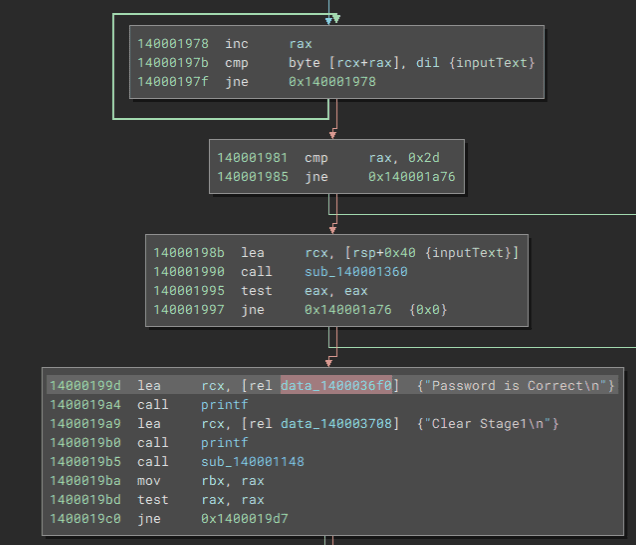
In other words, we can predict that sub_140001360 is a function that validates the input string (password) received by fgets, and returns 0 when the password is correct.
So, let’s rename sub_140001360 to the checkPassword function and analyze it in more detail.
If you double-click the sub_140001360 function (the checkPassword function) in Binary Ninja’s Graph view, you can inspect the code of the target function.
When you view the overall structure of the checkPassword function in Graph view, the processing branches in a complex way and at first glance does not seem easy to analyze.
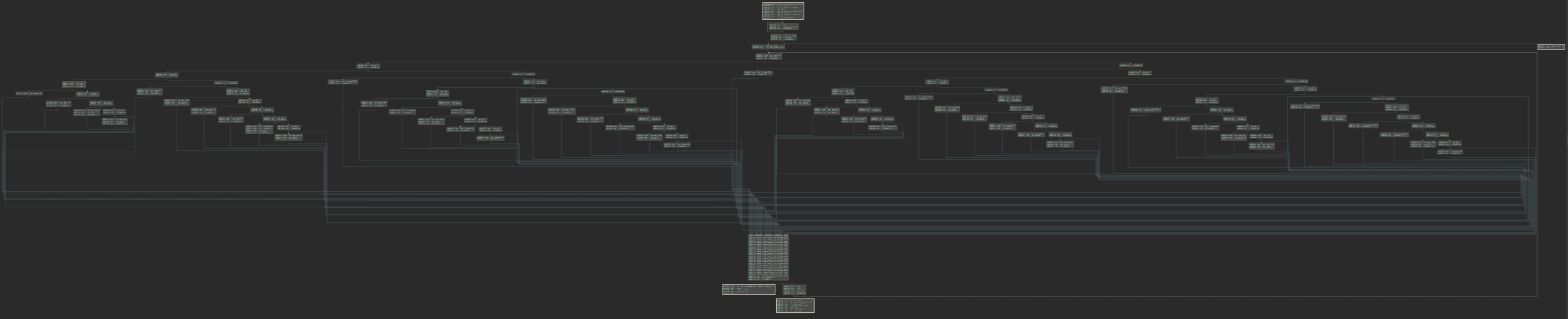
Of course, if you are already comfortable analyzing disassembly results or decompiled pseudocode, you can easily analyze the detailed behavior of this seemingly complex code using static analysis alone.
However, to make the analysis smoother, we will postpone the checkPassword function and perform dynamic analysis with a debugger in Chapter 4.
For that reason, in this chapter we will skip analysis of the checkPassword function for now and continue with the static analysis of the main function.
Load the Kernel Driver
If validation of the input string succeeds in the checkPassword function, DoPClient prints the strings Password is Correct and Clear Stage1 in sequence.
From this, it seems that the first Flag is the correct password that allows you to pass the checkPassword function.
Analysis of the checkPassword function and identification of the Flag are performed in Chapter 4.
If you inspect the code after password validation succeeds in the checkPassword function, you can see that at 0x1400019b5 the sub_140001148 function is executed, after which the program checks the value in the RAX register that stores the return value and performs a conditional branch.
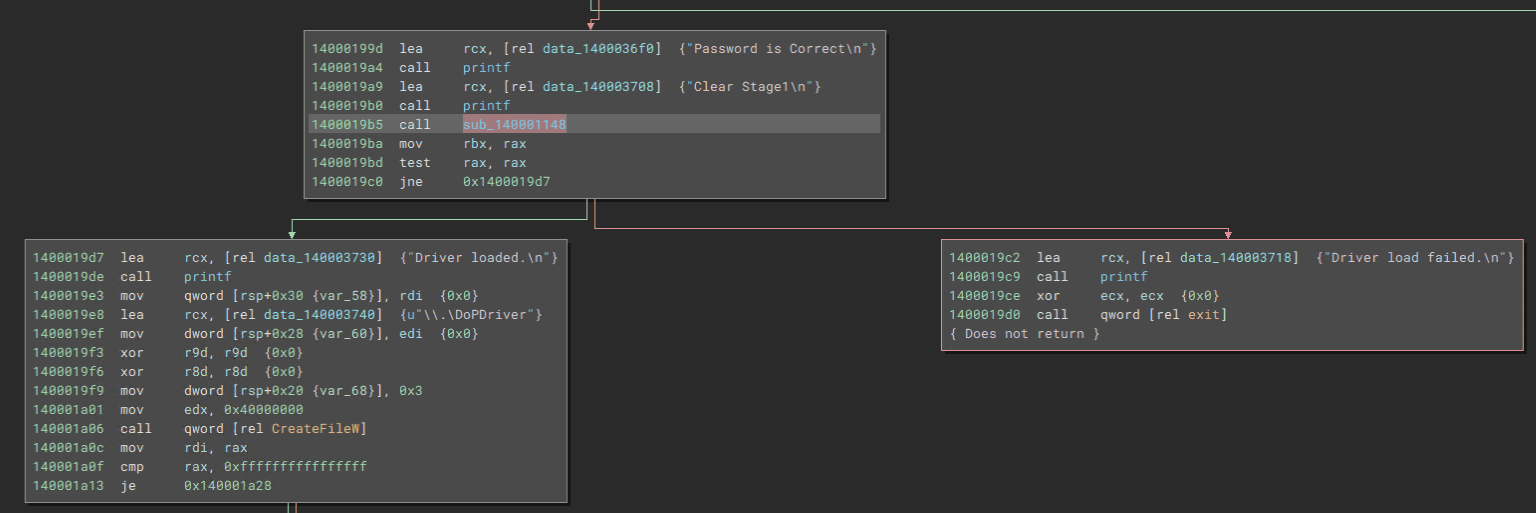
In the branch where the return value of sub_140001148 is not NULL, the string Driver loaded is printed, while in the other branch Driver load failed is printed and the program then exits.
From this, we can infer that sub_140001148 is a function that loads a kernel driver into the system, and that if loading the driver succeeds it is very likely to return a non-NULL value.
For that reason, rename sub_140001148 to something like loadDriver.
Although it is not especially necessary to understand the detailed implementation of the loadDriver function in order to analyze DoPClient and DoPDriver and obtain the Flags, we will take a quick look at it by referring to Binary Ninja’s decompilation result.
Below is an excerpt from the decompiled result of the loadDriver function.
SC_HANDLE loadDriver()

{
    void var_4a8;
    int64_t rax_1 = (__security_cookie ^ &var_4a8);
    SC_HANDLE rax_2 = OpenSCManagerW(nullptr, nullptr, 2);

    /* 中略 */

    void var_438;
    uint32_t rax_4;
    int64_t rdx_2;
    rax_4 = GetModuleFileNameA(nullptr, &var_438, 0x104);

    /* 中略 */

    char* rax_5 = strrchr(&var_438, 0x5c);

    /* 中略 */

    enum ENUM_SERVICE_TYPE var_488 = 0x40003390;
    void lpBinaryPathName;
    sub_14000105c(&lpBinaryPathName, 0x208, "%s\%s", &var_438);
    SC_HANDLE hSCObject = OpenServiceA(rax_2, "DoPDriver", 0xf003f);

    /* 中略 */

    PSTR var_468;
    __builtin_memset(&var_468, 0, 0x28);

    uint32_t* lpdwTagId;
    PSTR lpDependencies;
    PSTR lpServiceStartName;
    PSTR lpPassword;
    SC_HANDLE rax_6 = CreateServiceA(rax_2, "DoPDriver", "DoPDriver", 0x10030, SERVICE_KERNEL_DRIVER, SERVICE_DEMAND_START, SERVICE_ERROR_IGNORE, &lpBinaryPathName, var_468, lpdwTagId, lpDependencies, lpServiceStartName, lpPassword);

    /* 中略 */

    BOOL rax_8;
    int64_t rdx_4;
    rax_8 = StartServiceW(rax_6, 0, nullptr);
    if (rax_8 != 0)
    {
        printf("Service started successfully\n", rdx_4);
        CloseServiceHandle(rax_2);
        __security_check_cookie((rax_1 ^ &var_4a8));
        return rax_6;
    }
    printf("StartService failed (%d)\n", ((uint64_t)GetLastError()));

    /* 中略 */

}
Some functions still have unclear details, but it appears that OpenSCManager 3 obtains a handle (SC_HANDLE rax_2) to the service control manager database, and that OpenService 4 and CreateService 5 are used to register a service named DoPDriver.
When loading a kernel driver into a Windows system, the CreateService API is used just as it is for user-mode services 6, so this function is probably registering the DoPDriver.sys file as a service named DoPDriver.
For detailed information about kernel driver implementation and loading, books such as “Windows Kernel Programming, Second Edition” 6 are useful references.
The handle to the registered service obtained as the return value of the CreateService function (SC_HANDLE rax_6) is passed as an argument to the StartServiceW function 7, and when starting the DoPDriver service succeeds, the service handle is returned as the return value.
Access the Driver Object
The code below is executed after DoPDriver has been loaded successfully.
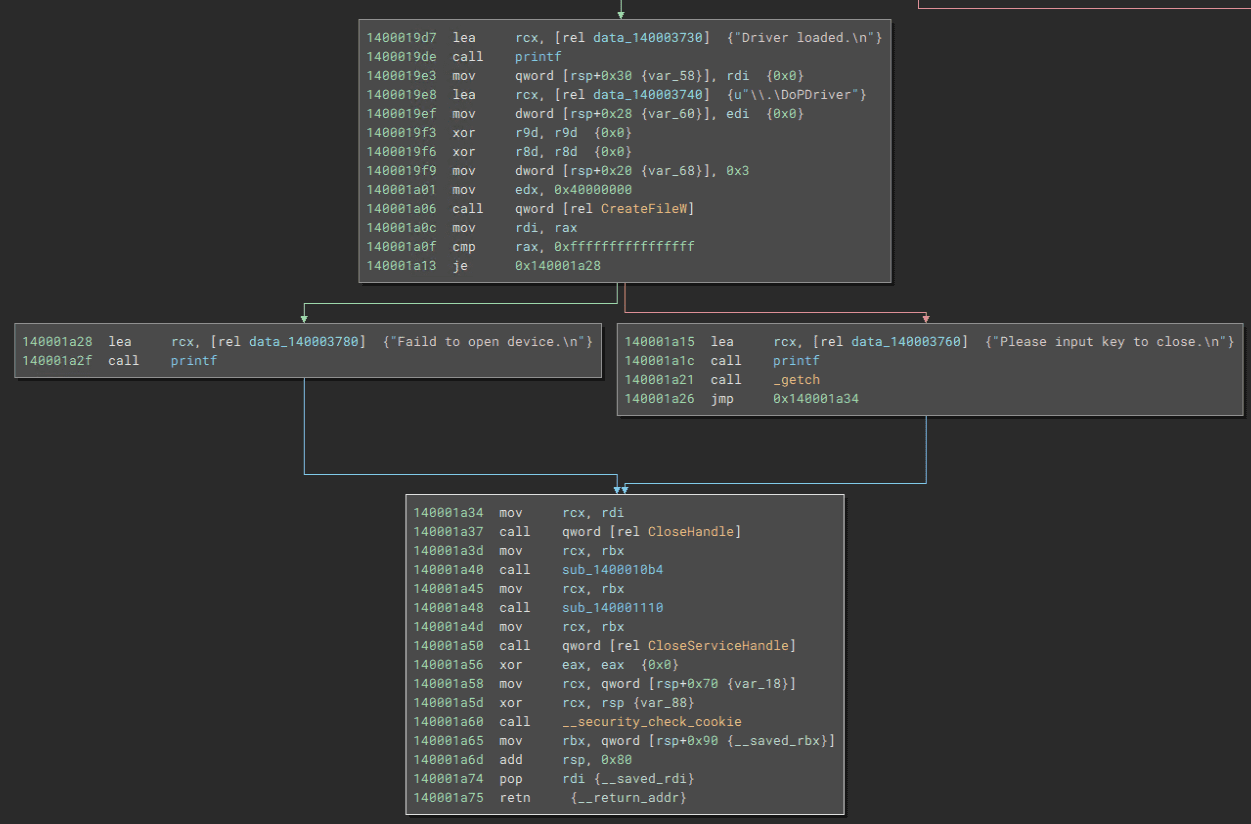
At 0x140001a06, the CreateFileW function 8 is executed with the path \\.\DoPDriver and several other values as arguments.
The CreateFileW function takes the following values as arguments and returns a handle to the specified file or device.
HANDLE CreateFileW(
  [in]           LPCWSTR               lpFileName,
  [in]           DWORD                 dwDesiredAccess,
  [in]           DWORD                 dwShareMode,
  [in, optional] LPSECURITY_ATTRIBUTES lpSecurityAttributes,
  [in]           DWORD                 dwCreationDisposition,
  [in]           DWORD                 dwFlagsAndAttributes,
  [in, optional] HANDLE                hTemplateFile
);
A user-mode process on Windows cannot access the device object of a kernel driver directly.
For that reason, when it is necessary to allow an application running in user mode to access a kernel driver, the kernel driver creates a symbolic link in the \GLOBAL\?? directory and links it to the name of the device object in the \Device directory.9
You can confirm that a kernel driver has registered a symbolic link for its driver object in the \GLOBAL\?? directory by using a tool such as WinObj.
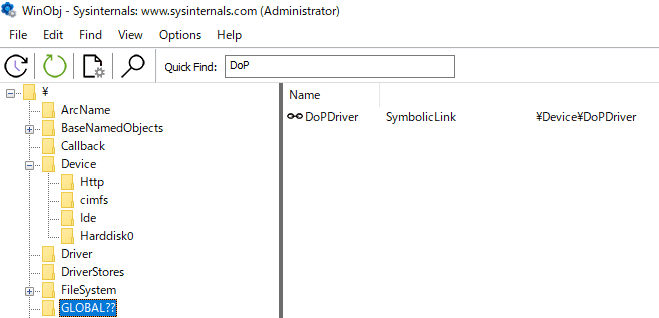
In a user-mode program, access to the kernel driver becomes possible by using this symbolic link with the CreateFileW function to obtain a handle to the driver object.
When specifying a symbolic link to a device object in the CreateFileW function, you need to add the prefix \\.\ as in \\.\DoPDriver so that the I/O manager does not mistake it for a file named DoPDriver in the current folder.10
The code executed after obtaining a handle to DoPDriver with the CreateFileW function is shown below.
call    qword [rel CreateFileW]
mov     rdi, rax
cmp     rax, 0xffffffffffffffff
je      0x140001a28

lea     rcx, [rel data_140003760]  {"Please input key to close.\n"}
call    printf
call    _getch

mov     rcx, rdi
call    qword [rel CloseHandle]

{省略}
Here, after printing the string Please input key to close, the program appears to wait for user input.
Then, when it receives any input with the getch function, it closes the obtained handle, deletes the loaded kernel driver, and ends execution of the program.
Because the device object obtained through the CreateFileW function is not used afterward, it seems that we will need to analyze DoPDriver in order to obtain the second Flag.
Analysis of DoPDriver is covered in Chapters 5 and 6.
Summary of Chapter 3
In Chapter 3, we performed static analysis of DoPClient, which is a user-mode program.
From the result of disassembling the program with Binary Ninja, we confirmed that DoPClient behaves as follows.
- It receives a password string from standard input with the fgets function.
- It verifies that the input string is 45 characters long.
- It validates the input password string with the checkPassword function (
sub_140001360). At this point, the correct password that passes validation by checkPassword appears to be the first Flag. - If the correct password is entered, it loads
DoPDriver.sysinto the system as a kernel driver. - It obtains a handle to DoPDriver’s driver object with the CreateFileW function.
- It waits for arbitrary input from the user and then exits.
In Chapter 4, we will use WinDbg to dynamically analyze the behavior of the checkPassword function and identify the correct password that becomes the first Flag.
Links to Each Chapter
- Preface
- Chapter 1: Environment Setup
- Chapter 2: Surface Analysis of DoPClient and DoPDriver
- Chapter 3: Static Analysis of DoPClient
- Chapter 4: Dynamic Analysis of DoPClient
- Chapter 5: Static Analysis of DoPDriver
- Chapter 6: Dynamic Analysis of DoPDriver
-
実践バイナリ解析 バイナリ計装、解析、逆アセンブリのためのLinuxツールの作り方(Dennis Andriesse 著 / 株式会社クイープ,遠藤美代子 訳 / KADOKAWA / 2022 年)
↩ -
詳解セキュリティコンテスト CTF で学ぶ脆弱性攻略の技術 P.375 (梅内 翼, 清水 祐太郎, 藤原 裕大, 前田 優人, 米内 貴志, 渡部 裕 著 / マイナビ出版 / 2021 年)
↩ -
OpenSCManagerW function https://learn.microsoft.com/ja-jp/windows/win32/api/winsvc/nf-winsvc-openscmanagerw
↩ -
OpenServiceA function https://learn.microsoft.com/ja-jp/windows/win32/api/winsvc/nf-winsvc-openservicea
↩ -
CreateServiceA function https://learn.microsoft.com/ja-jp/windows/win32/api/winsvc/nf-winsvc-createservicea
↩ -
Windows Kernel Programming, Second Edition P.27 (Pavel Yosifovich 著 / Independently published / 2023 年)
↩ -
StartServiceW function https://learn.microsoft.com/ja-jp/windows/win32/api/winsvc/nf-winsvc-startservicew
↩ -
CreateFileW function https://learn.microsoft.com/ja-jp/windows/win32/api/fileapi/nf-fileapi-createfilew
↩ -
インサイド Windows 第 7 版 上 P.558 (Pavel Yosifovich, Alex Ionescu, Mark E. Russinovich, David A. Solomon 著 / 山内 和朗 訳 / 日系 BP 社 / 2018 年)
↩ -
Windows Kernel Programming, Second Edition P.52 (Pavel Yosifovich 著 / Independently published / 2023 年)
↩