This page has been machine-translated from the original page.
In Chapters 3 and 4, we analyzed DoPClient and identified the password (the first Flag).
As confirmed in Chapter 3, when the correct password is entered into DoPClient, the program prints the strings Password is Correct and Clear Stage1 in sequence, then loads the kernel driver DoPDriver.sys and uses the CreateFileW function on the driver object.
In Chapters 4 and 5, we analyze the kernel driver module DoPDriver in order to identify the second Flag.
Table of Contents
- Identifying the DriverEntry Function
- Analyzing the DriverEntry Function
- Analyzing the Dispatch Routine Callback Functions
- Analyzing the
IRP_MJ_CREATECallback Function - Analyzing the
IRP_MJ_CLOSECallback Function - Analyzing the Callback Function Registered with PsSetCreateProcessNotifyRoutine
- Analyzing the Function That Validates the Image File Name
- Summary
- Links to the Chapters
Identifying the DriverEntry Function
As confirmed in Chapter 2, the DoPDriver.sys file, which is a Windows kernel driver module, is also built as a file in PE format, just like a user-mode program.
Therefore, DoPDriver.sys can also be statically analyzed with analysis tools such as Binary Ninja, just like DoPClient.exe.
However, you need to be careful because a kernel driver module like DoPDriver has a slightly different structure from a user-mode program like DoPClient.
For example, a user-mode program written in C starts from the main function, but Windows kernel drivers do not have a main function.
In Windows kernel drivers, the DriverEntry function is configured as the entry point, and it is executed first when the kernel starts the driver module.1
Therefore, when statically analyzing a kernel driver file, identifying this DriverEntry function first is one useful approach.
The DriverEntry function of a Windows kernel driver module is defined as follows. The first argument is a pointer to a DRIVER_OBJECT structure, and the second argument is a pointer to the path string of the driver’s registry key.2
DRIVER_INITIALIZE DriverEntry;

_Use_decl_annotations_ NTSTATUS DriverEntry(
struct _DRIVER_OBJECT  *DriverObject,
PUNICODE_STRING  RegistryPath
)
{
    // Function body
}
Note that the example above is code for creating a WDM (Windows Driver Model) driver, which has been available since Windows 98. However, the fact that the DriverEntry function is executed when the driver starts and that pointers to a DRIVER_OBJECT structure and a registry-key path string are passed as arguments is also common to KMDF/UMDF, which are supported from Windows Vista onward. (That said, KMDF and UMDF drivers require significantly different code from WDM drivers—for example, they must create a WDFDRIVER object with the WdfDriverCreate function.)3
The easiest way to identify the DriverEntry function is to use an analysis tool such as Binary Ninja to find the entry point that receives DriverObject and RegistryPath as arguments, and then identify the function called with DriverObject as an argument.
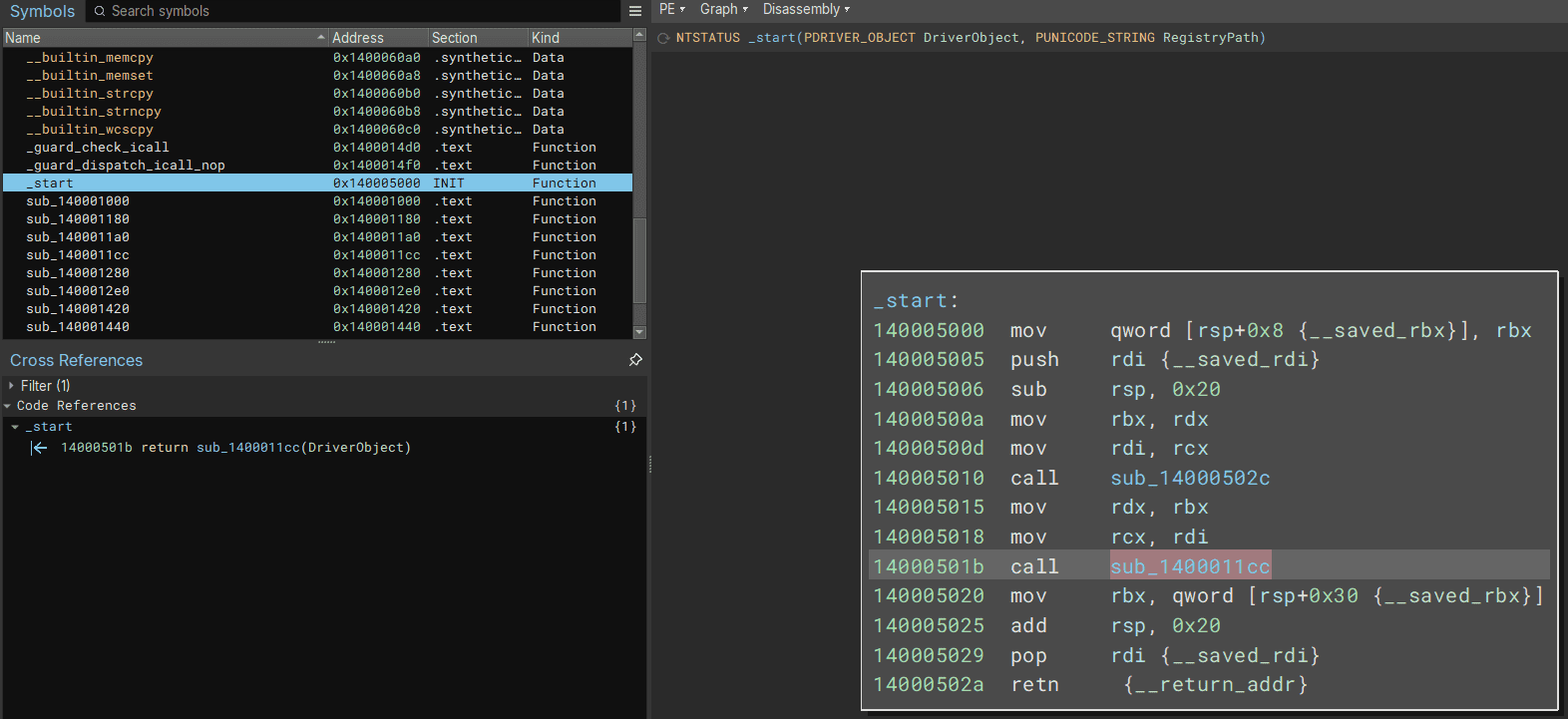
However, in this chapter, we will try another approach that uses the characteristics of the DriverEntry function to identify its address.
To identify the DriverEntry function by analyzing DoPDriver.sys, first load DoPDriver.sys into Binary Ninja and open the Symbols window.
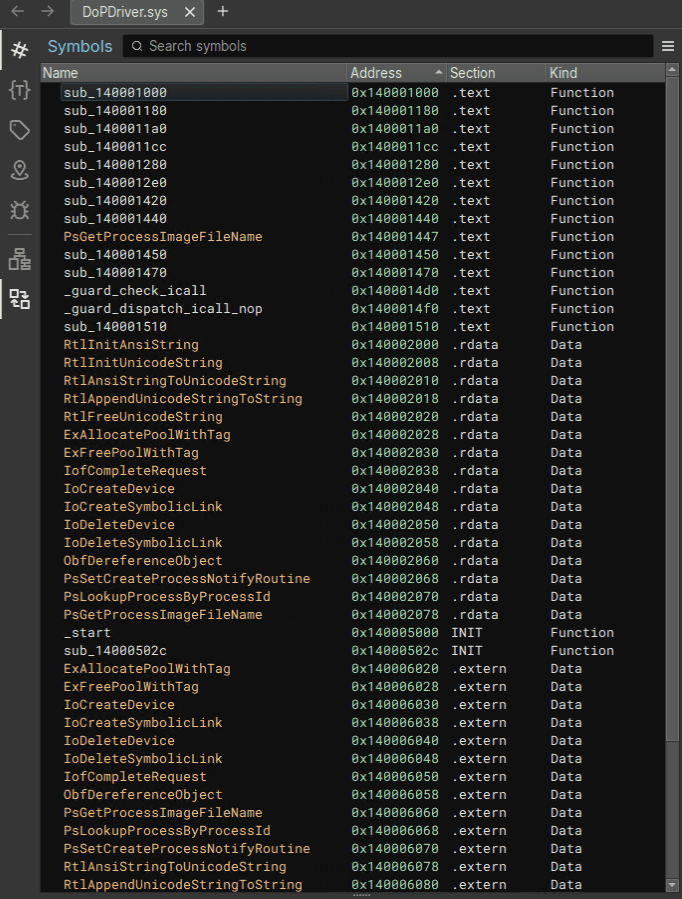
Because no symbols are present, you cannot find the DriverEntry function from the Symbols window.
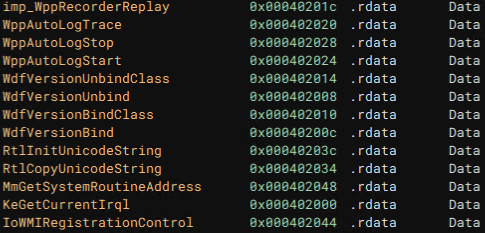
However, because the exported functions do not include Wdf* or Wpp*, we can judge that it is more likely a WDM driver than a KMDF/UMDF driver.
For example, a simple KMDF driver looks like the following when analyzed in Binary Ninja. (This is not the DoPDriver.sys analysis screen.)
In WDM drivers, as a rule, one or more device objects representing devices must first be created in DriverEntry.4
Because device objects are created with the IoCreateDevice function 5, in many cases you can identify the code executed by the DriverEntry function by checking where this API function is called.
If you are using Binary Ninja, click IoCreateDevice in the .rdata section of the Symbols window.
Then the address 0x1400011cc appears in the [Code References] area of the Cross References window.
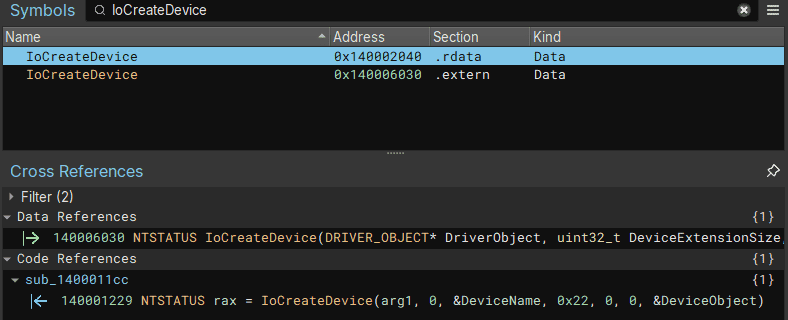
Clicking this address reveals a function that receives a pointer to a DRIVER_OBJECT structure as an argument and calls the IoCreateDevice function.
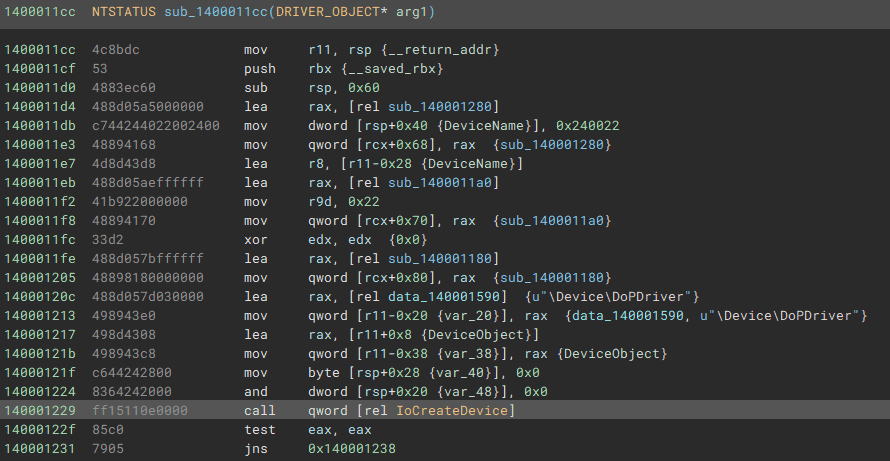
This function is DriverEntry, so rename it if necessary.
At this point, we have identified the DriverEntry function.
Also, if a device driver implements an IOCTL interface 6, it should register an IOCTL dispatch routine in DriverEntry to handle each IOCTL request.
An IOCTL dispatch routine is registered with assembly code such as mov qword [rcx+0x70], <function pointer of the dispatch routine> starting at offset 0x70 of the DRIVER_OBJECT structure 7.8
typedef struct _DRIVER_OBJECT {
  CSHORT             Type;
  CSHORT             Size;
  PDEVICE_OBJECT     DeviceObject;
  ULONG              Flags;
  PVOID              DriverStart;
  ULONG              DriverSize;
  PVOID              DriverSection;
  PDRIVER_EXTENSION  DriverExtension;
  UNICODE_STRING     DriverName;
  PUNICODE_STRING    HardwareDatabase;
  PFAST_IO_DISPATCH  FastIoDispatch;
  PDRIVER_INITIALIZE DriverInit;
  PDRIVER_STARTIO    DriverStartIo;
  PDRIVER_UNLOAD     DriverUnload;
  PDRIVER_DISPATCH   MajorFunction[IRP_MJ_MAXIMUM_FUNCTION + 1];
} DRIVER_OBJECT, *PDRIVER_OBJECT;
Therefore, another possible way to identify the DriverEntry function is to look for code that accesses offset 0x70 of the DRIVER_OBJECT structure.
If you are using Binary Ninja, first click the {T} icon in the menu on the left side of the screen to open the Types window.
There, search for the DRIVER_OBJECT structure and click it to display its information.
After clicking PDRIVER_DISPATCH MajorFunction[***]; at offset 0x70 of the DRIVER_OBJECT structure and then checking the Code References window, you can confirm that it shows the address of the DriverEntry function we renamed earlier.
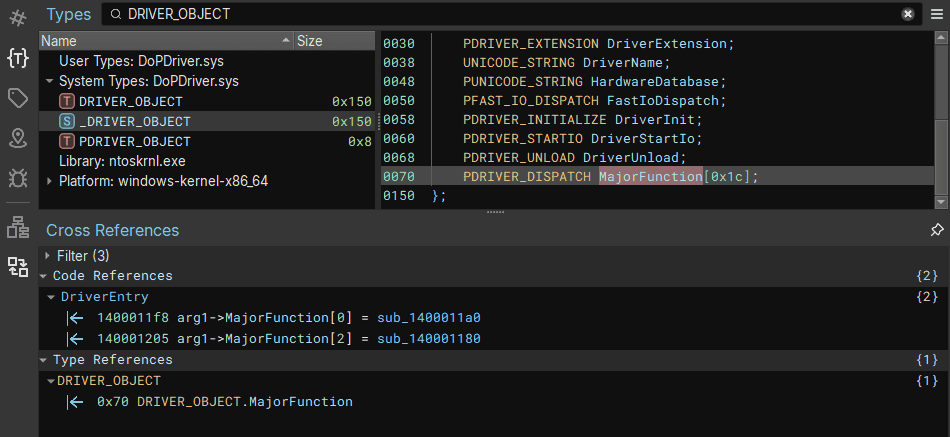
In this way, information from structures and similar sources can sometimes also be used to refer to the address of the function you want to identify.
Analyzing the DriverEntry Function
Now that we have identified the address of the DriverEntry function, we can analyze its execution code in Binary Ninja’s Graph view, just as we did in Chapter 3.
The following is the disassembly of the DriverEntry function shown in Graph view.
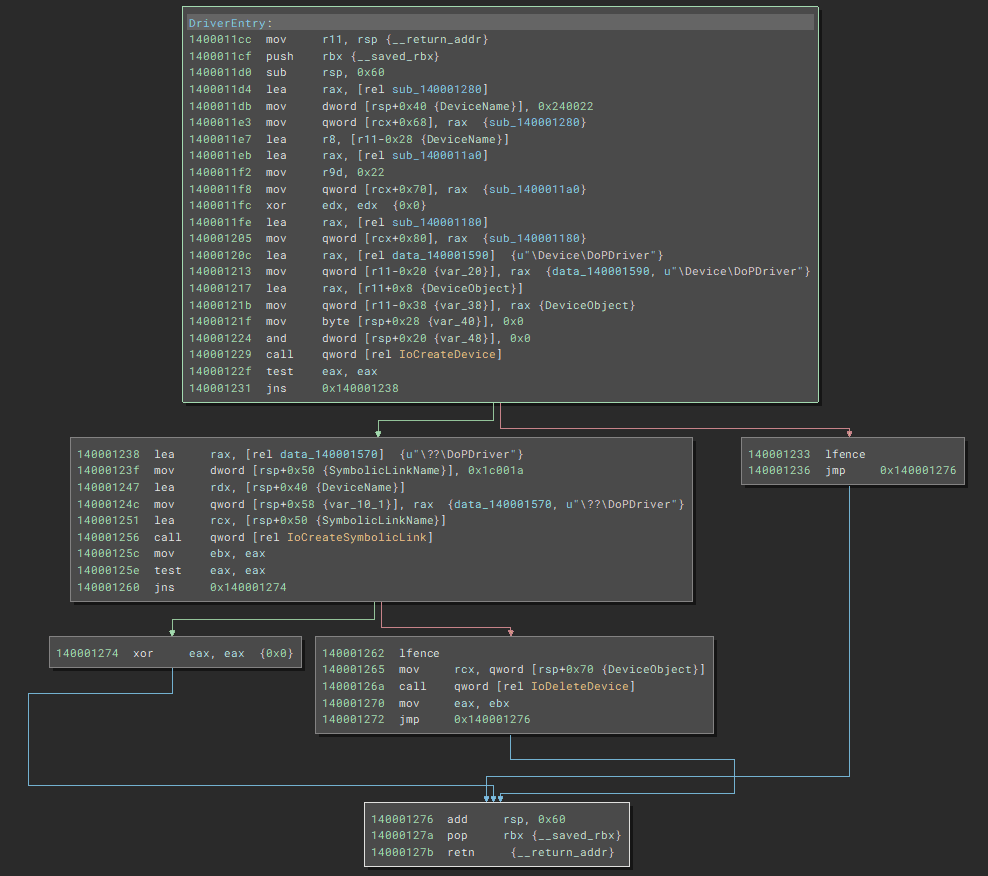
The first block creates a device object with the IoCreateDevice function.
DriverEntry:
mov     r11, rsp {__return_addr}
push    rbx {__saved_rbx}
sub     rsp, 0x60
lea     rax, [rel sub_140001280]
mov     dword [rsp+0x40 {DeviceName}], 0x240022
mov     qword [rcx+0x68], rax  {sub_140001280}
lea     r8, [r11-0x28 {DeviceName}]
lea     rax, [rel sub_1400011a0]
mov     r9d, 0x22
mov     qword [rcx+0x70], rax  {sub_1400011a0}
xor     edx, edx  {0x0}
lea     rax, [rel sub_140001180]
mov     qword [rcx+0x80], rax  {sub_140001180}
lea     rax, [rel data_140001590]  {u"\Device\DoPDriver"}
mov     qword [r11-0x20 {var_20}], rax  {data_140001590, u"\Device\DoPDriver"}
lea     rax, [r11+0x8 {DeviceObject}]
mov     qword [r11-0x38 {var_38}], rax {DeviceObject}
mov     byte [rsp+0x28 {var_40}], 0x0
and     dword [rsp+0x20 {var_48}], 0x0
call    qword [rel IoCreateDevice]
test    eax, eax
jns     0x140001238
The IoCreateDevice function takes the following arguments and creates the device object used by the driver.5
NTSTATUS IoCreateDevice(
  [in]           PDRIVER_OBJECT  DriverObject,
  [in]           ULONG           DeviceExtensionSize,
  [in, optional] PUNICODE_STRING DeviceName,
  [in]           DEVICE_TYPE     DeviceType,
  [in]           ULONG           DeviceCharacteristics,
  [in]           BOOLEAN         Exclusive,
  [out]          PDEVICE_OBJECT  *DeviceObject
);
Clicking the IoCreateDevice function in Binary Ninja’s Graph view is very convenient because it analyzes the arguments for you in the Cross References window, as shown below.

The first argument, arg1, uses the pointer to the DRIVER_OBJECT structure that the DriverEntry function received as an argument.
Also, DeviceName uses the name of the device object defined inside the function.
At this point, note that the string used as DeviceName is a pointer to an object of the UNICODE_STRING structure 9.
typedef struct _UNICODE_STRING {
  USHORT Length;
  USHORT MaximumLength;
  PWSTR  Buffer;
} UNICODE_STRING, *PUNICODE_STRING;
Many functions used by Windows kernel drivers use safe string objects, such as the UNICODE_STRING structure, that take proper buffer handling into account from the standpoint of software safety.10
As mentioned above, a string represented by a UNICODE_STRING structure is not a simple string. It is passed to functions such as IoCreateDevice as a structure that includes elements such as the buffer size.
For that reason, you need to keep this point in mind especially when performing dynamic analysis with a debugger.
Let’s actually read the code that prepares DeviceName, which is an argument to IoCreateDevice.
mov     r11, rsp {__return_addr}
push    rbx {__saved_rbx}
sub     rsp, 0x60
***
mov     dword [rsp+0x40 {DeviceName}], 0x240022
***
lea     r8, [r11-0x28 {DeviceName}]
***
lea     rax, [rel data_140001590]  {u"\Device\DoPDriver"}
mov     qword [r11-0x20 {var_20}], rax  {data_140001590, u"\Device\DoPDriver"}
Binary Ninja interprets the stack area at address RSP+0x40 as DeviceName.
However, in the code mov dword [rsp+0x40 {DeviceName}], 0x240022, the value stored in that area is 0x240022 rather than a string.
This is because, as explained earlier, DeviceName is defined not as a plain string but as an object of the UNICODE_STRING structure.
In a UNICODE_STRING structure, the first 2 bytes store Length and the next 2 bytes store MaximumLength.
In other words, storing 0x240022 in the stack area at RSP+0x40 corresponds to writing a UNICODE_STRING structure whose Length is 0x22 and whose MaximumLength is 0x24.
The pointer to the actual string (\Device\DoPDriver) is stored in the Buffer field of the UNICODE_STRING structure.
You can also confirm this by running the dt nt!_UNICODE_STRING rsp+0x40 command when dynamically analyzing the DriverEntry function during kernel debugging.
kd> dt nt!_UNICODE_STRING rsp+0x40
***
+0x000 Length           : 0x22
+0x002 MaximumLength    : 0x24
+0x008 Buffer           : 0xfffff807`100a1590  "\Device\DoPDriver"
Also, DeviceType, the argument after DeviceName, receives a value indicating the device type.
In DoPDriver, DeviceType is set to 0x22, which corresponds to FILE_DEVICE_UNKNOWN, indicating that it is not a standard Windows device.11
When the IoCreateDevice function is called with these arguments, a pointer to the DEVICE_OBJECT structure is stored at the address pointed to by the DeviceObject argument.
If creating the device object succeeds, the following code after 0x140001238 is executed.
lea     rax, [rel data_140001570]  {u"\??\DoPDriver"}
mov     dword [rsp+0x50 {SymbolicLinkName}], 0x1c001a
lea     rdx, [rsp+0x40 {DeviceName}]
mov     qword [rsp+0x58 {var_10_1}], rax  {data_140001570, u"\??\DoPDriver"}
lea     rcx, [rsp+0x50 {SymbolicLinkName}]
call    qword [rel IoCreateSymbolicLink]
mov     ebx, eax
test    eax, eax
jns     0x140001274
This code uses the IoCreateSymbolicLink function 12 to create a symbolic link (\??\DoPDriver) corresponding to the device object.
The actual device object created by the IoCreateDevice function exists at \Device\DoPDriver, but as explained in Chapter 3, a user-mode process cannot directly access device objects in the \Device directory.
Therefore, if a user-mode program such as DoPClient needs to access the driver, the kernel driver must create a symbolic link in the \GLOBAL\?? directory and link it to the name of the device object in the \Device directory.
In the code above, the symbolic link for the device object at \Device\DoPDriver is registered as \??\DoPDriver.
Analyzing the Dispatch Routine Callback Functions
In the DriverEntry function, only the device object was created and the symbolic link for that device object was registered.
So where is the code that runs when the user-mode program DoPClient uses DoPDriver?
In the case of WDM drivers, the interface commonly used to execute driver operations in response to requests from applications is the dispatch routine defined by the entries in the MajorFunction array of the driver object.
The MajorFunction array of the driver object contains callback functions corresponding to open (CreateFile) and close (CloseHandle), as well as read and write (ReadFile/WriteFile), and DeviceIoControl operations from user-mode programs.
When a user-mode program performs these operations on a device driver, the system’s I/O manager allocates an I/O Request Packet (IRP) and executes the driver’s dispatch routine corresponding to that request.13
As confirmed earlier in this chapter, the MajorFunction array is defined as PDRIVER_DISPATCH MajorFunction[***]; starting at offset 0x70 of the DRIVER_OBJECT structure.
In DoPDriver, the callback functions for two dispatch routines were set in the driver object at 0x1400011f8 and 0x1400011fe in the DriverEntry function.
mov     qword [rcx+0x70], rax  {sub_1400011a0}
***
mov     qword [rcx+0x80], rax  {sub_140001180}
The MajorFunction array is defined as PDRIVER_DISPATCH MajorFunction[***];, and in a C implementation it would be written as DriverObject->MajorFunction[IRP_MJ_CREATE] = <pointer to the callback function>.
Constants such as IRP_MJ_CREATE and IRP_MJ_CLOSE are defined in wdm.h and correspond to the following values.
IRP_MJ_CREATE                   0x00
IRP_MJ_CREATE_NAMED_PIPE        0x01
IRP_MJ_CLOSE                    0x02
IRP_MJ_READ                     0x03
IRP_MJ_WRITE                    0x04
IRP_MJ_QUERY_INFORMATION        0x05
IRP_MJ_SET_INFORMATION          0x06
IRP_MJ_QUERY_EA                 0x07
IRP_MJ_SET_EA                   0x08
IRP_MJ_FLUSH_BUFFERS            0x09
IRP_MJ_QUERY_VOLUME_INFORMATION 0x0a
IRP_MJ_SET_VOLUME_INFORMATION   0x0b
IRP_MJ_DIRECTORY_CONTROL        0x0c
IRP_MJ_FILE_SYSTEM_CONTROL      0x0d
IRP_MJ_DEVICE_CONTROL           0x0e
IRP_MJ_INTERNAL_DEVICE_CONTROL  0x0f
IRP_MJ_SHUTDOWN                 0x10
IRP_MJ_LOCK_CONTROL             0x11
IRP_MJ_CLEANUP                  0x12
IRP_MJ_CREATE_MAILSLOT          0x13
IRP_MJ_QUERY_SECURITY           0x14
IRP_MJ_SET_SECURITY             0x15
IRP_MJ_POWER                    0x16
IRP_MJ_SYSTEM_CONTROL           0x17
IRP_MJ_DEVICE_CHANGE            0x18
IRP_MJ_QUERY_QUOTA              0x19
IRP_MJ_SET_QUOTA                0x1a
IRP_MJ_PNP                      0x1b
IRP_MJ_PNP_POWER                IRP_MJ_PNP
IRP_MJ_MAXIMUM_FUNCTION         0x1b
In other words, because DoPDriver registers dispatch routines at RCX+0x70 and RCX+0x80, we can determine that DriverObject->MajorFunction[0(IRP_MJ_CREATE)] and DriverObject->MajorFunction[2(IRP_MJ_CLOSE)] are implemented.
Analyzing the IRP_MJ_CREATE Callback Function
The callback function registered in DriverObject->MajorFunction[0(IRP_MJ_CREATE)] is at address 0x1400011a0.
The result of analyzing this function in Binary Ninja’s Graph view is shown below.
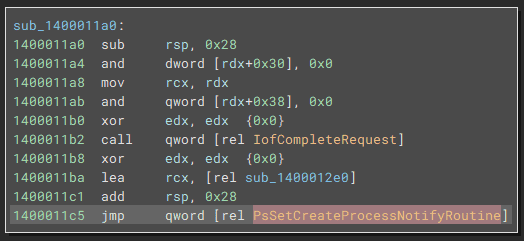
The IofCompleteRequest function 14 called first is a macro that completes I/O processing and returns the IRP received by the driver to the I/O manager.
This code appears to return the IRP immediately without performing any I/O processing, but if a device driver uses an IRP, some operation is performed on that IRP before IofCompleteRequest is executed.
Besides IofCompleteRequest, this callback function also executes the PsSetCreateProcessNotifyRoutine function 15.
PsSetCreateProcessNotifyRoutine is a function that can add or remove a callback routine specified by the device driver to the routines executed each time a process is created or deleted.
NTSTATUS PsSetCreateProcessNotifyRoutine(
  [in] PCREATE_PROCESS_NOTIFY_ROUTINE NotifyRoutine,
  [in] BOOLEAN                        Remove
);
By using this function, a device driver can execute arbitrary code whenever a new process is created or deleted in the system.
PsSetCreateProcessNotifyRoutine is also used in part by PROCMON24.SYS, which Sysinternals Procmon depends on.
Inside DoPDriver, PsSetCreateProcessNotifyRoutine is called with the following code.
Here, the function pointer at 0x1400012e0 is passed as the first argument, and PsSetCreateProcessNotifyRoutine adds it as a callback routine.
xor     edx, edx  {0x0}
lea     rcx, [rel sub_1400012e0]
add     rsp, 0x28
jmp     qword [rel PsSetCreateProcessNotifyRoutine]
Because the function at address 0x1400012e0 that is added to the callback routine is related to identifying the second Flag, we will analyze it in a later section.
Analyzing the IRP_MJ_CLOSE Callback Function
The address of the callback function registered in the other DriverObject->MajorFunction[2(IRP_MJ_CLOSE)] is 0x140001180.
The disassembled code for this function is shown below, and it does nothing except return the IRP through IofCompleteRequest.
Therefore, it seems safe to ignore this function.
sub_140001180:
sub     rsp, 0x28
and     dword [rdx+0x30], 0x0
mov     rcx, rdx
and     qword [rdx+0x38], 0x0
xor     edx, edx  {0x0}
call    qword [rel IofCompleteRequest]
xor     eax, eax  {0x0}
add     rsp, 0x28
retn     {__return_addr}
Analyzing the Callback Function Registered with PsSetCreateProcessNotifyRoutine
The address of the callback function registered with PsSetCreateProcessNotifyRoutine inside the dispatch routine registered by DriverObject->MajorFunction[0(IRP_MJ_CREATE)] was 0x1400012e0.
Because this function references the string FLAG{The_important_process_is_, we can expect that it performs some processing related to identifying the second Flag.
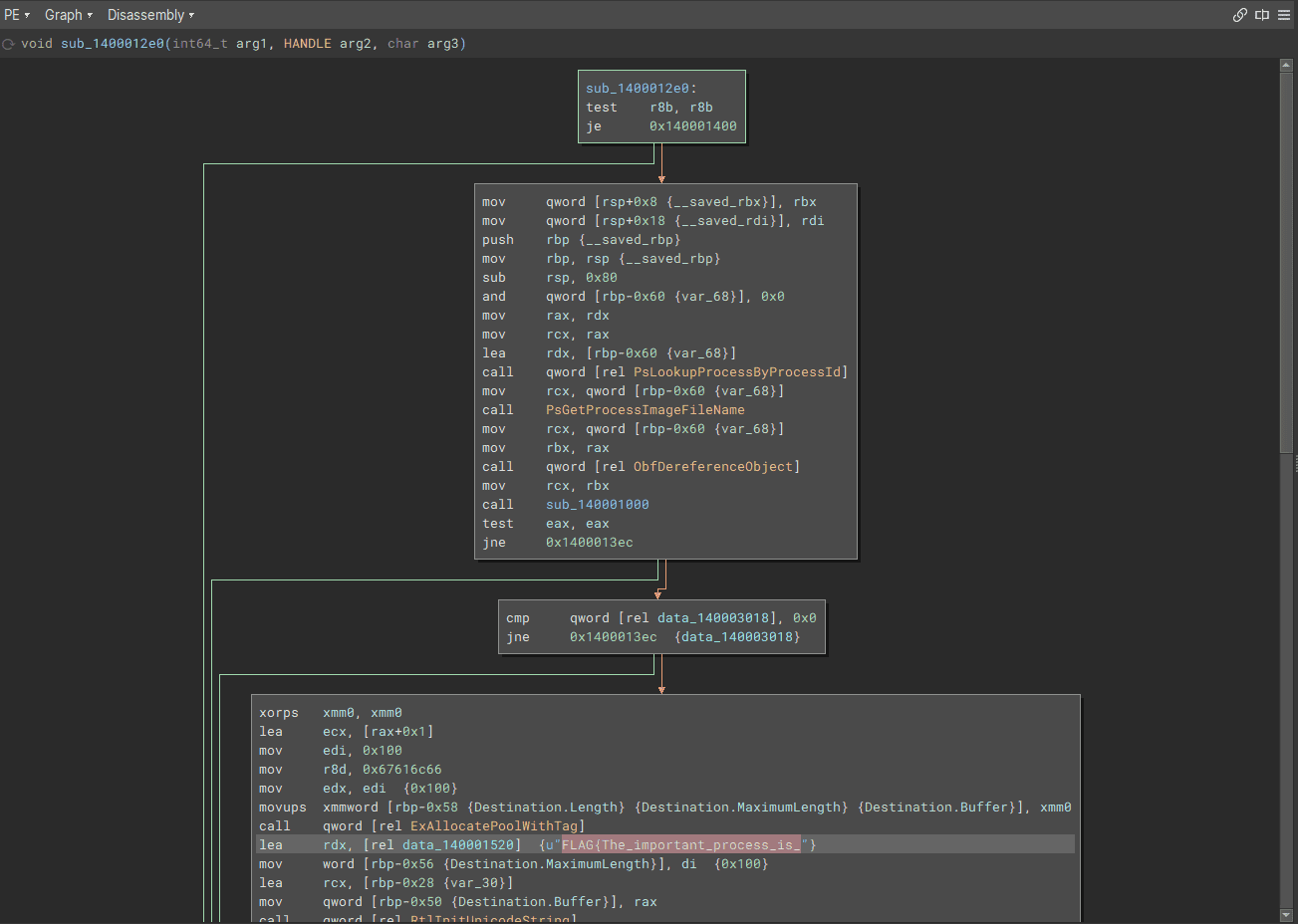
First, let’s analyze the following code block immediately after the function call.
mov     qword [rsp+0x8 {__saved_rbx}], rbx
mov     qword [rsp+0x18 {__saved_rdi}], rdi
push    rbp {__saved_rbp}
mov     rbp, rsp {__saved_rbp}
sub     rsp, 0x80
and     qword [rbp-0x60 {var_68}], 0x0
mov     rax, rdx
mov     rcx, rax
lea     rdx, [rbp-0x60 {var_68}]
call    qword [rel PsLookupProcessByProcessId]
mov     rcx, qword [rbp-0x60 {var_68}]
call    PsGetProcessImageFileName
mov     rcx, qword [rbp-0x60 {var_68}]
mov     rbx, rax
call    qword [rel ObfDereferenceObject]
mov     rcx, rbx
call    sub_140001000
test    eax, eax
jne     0x1400013ec
This code block first calls the PsLookupProcessByProcessId function 16 with the process ID that the callback function received as its second argument.
NTSTATUS PsLookupProcessByProcessId(
  [in]  HANDLE    ProcessId,
  [out] PEPROCESS *Process
);
Because this function is the callback routine registered with PsSetCreateProcessNotifyRoutine, it receives three arguments: ParentId, ProcessId, and Create.17
PCREATE_PROCESS_NOTIFY_ROUTINE PcreateProcessNotifyRoutine;

void PcreateProcessNotifyRoutine(
  [in] HANDLE ParentId,
  [in] HANDLE ProcessId,
  [in] BOOLEAN Create
)
{...}
In other words, the PsLookupProcessByProcessId function receives the ProcessId value taken by this callback routine and obtains a pointer to the EPROCESS structure for that process.
The pointer to the EPROCESS structure obtained here is stored in the stack area RBP-0x60.
The next code uses this pointer address to execute the PsGetProcessImageFileName function 18, obtaining the image file name of the process captured by the callback routine.
LPSTR NTAPI PsGetProcessImageFileName(PEPROCESS Process){
    return (LPSTR)Process->ImageFileName;
}
PsGetProcessImageFileName is an undocumented function, but it has been introduced in sources such as Sysinternals newsletters as a function that can be used to obtain a process image file name.
After PsGetProcessImageFileName obtains the image file name, the function at address 0x140001000 is executed using the obtained file name as an argument.
call    PsGetProcessImageFileName
***
mov     rbx, rax
***
mov     rcx, rbx
call    sub_140001000
When analyzing this function in Graph view, you can see that it implements very complex branching using the received file name, and at first glance it is difficult to determine the detailed behavior.
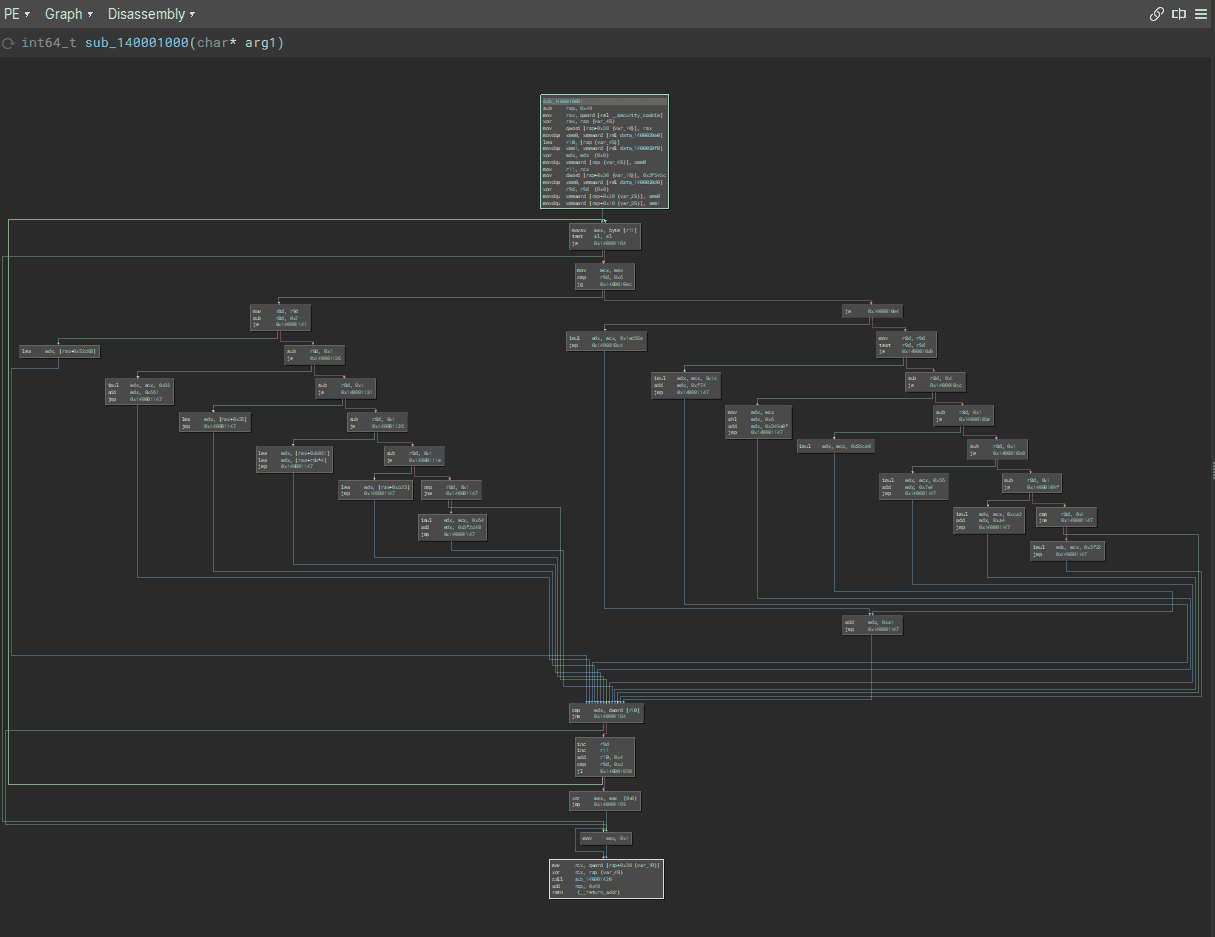
However, as shown below, a code block containing FLAG{The_important_process_is_ can be reached only when the function at address 0x140001000 returns 0, so it is highly likely that the function at address 0x140001000 performs some kind of check on the process image file name. (The detailed behavior of the function at address 0x140001000 will be described later.)
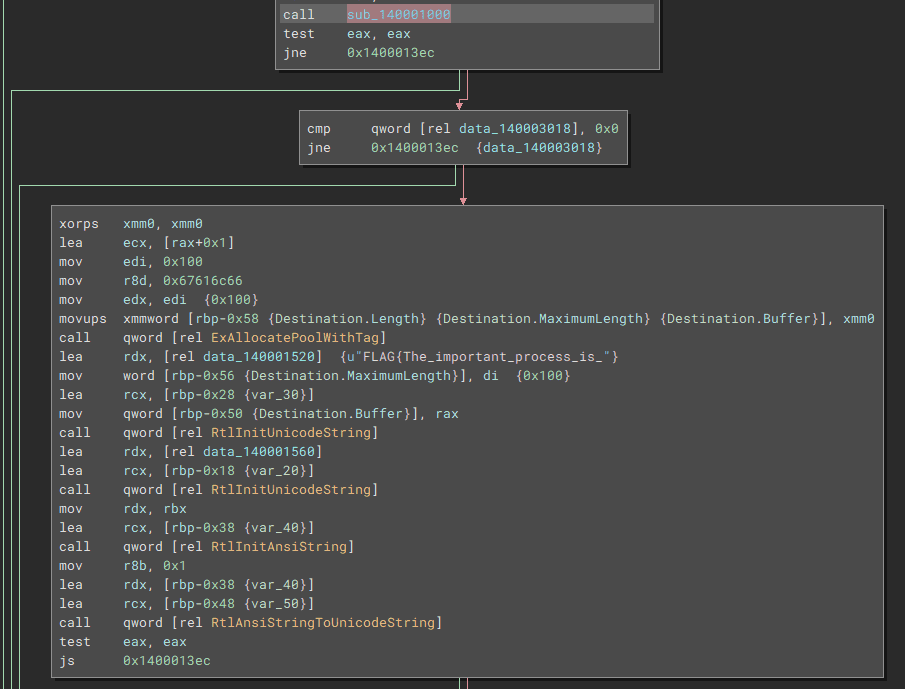
If the image file name passes the validation performed by the function at address 0x140001000, the following code is executed inside the callback function registered with PsSetCreateProcessNotifyRoutine.
xorps   xmm0, xmm0
lea     ecx, [rax+0x1]
mov     edi, 0x100
mov     r8d, 0x67616c66
mov     edx, edi  {0x100}
movups  xmmword [rbp-0x58 {Destination.Length} {Destination.MaximumLength} {Destination.Buffer}], xmm0
call    qword [rel ExAllocatePoolWithTag]
The ExAllocatePoolWithTag function 19 executed here allocates a memory pool in the system and returns the allocated pointer.
This function’s third argument specifies the pool tag to assign to the allocated memory area.
PVOID ExAllocatePoolWithTag(
  [in] __drv_strictTypeMatch(__drv_typeExpr)POOL_TYPE PoolType,
  [in] SIZE_T                                         NumberOfBytes,
  [in] ULONG                                          Tag
);
Therefore, although Binary Ninja does not recognize it, the 0x67616c66 loaded into the R8 register by the line mov r8d, 0x67616c66 is a 4-byte string used to specify the pool tag g(0x67) a(0x61) l(0x6c) f(0x66).
The subsequent processing is somewhat difficult to analyze from the disassembly result alone, but if you refer to Binary Ninja’s decompilation, the behavior becomes easy to understand.
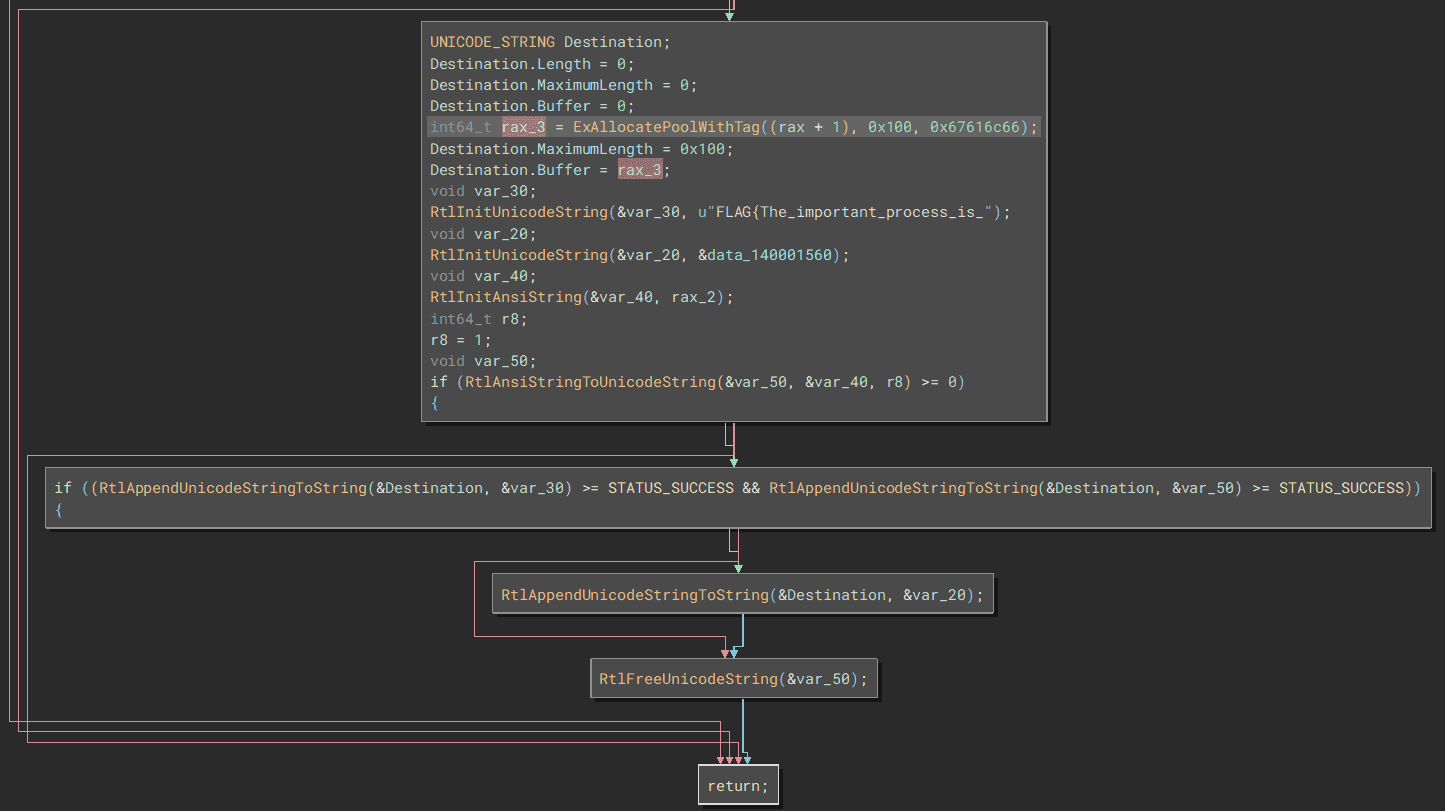
First, the pool region obtained by ExAllocatePoolWithTag is associated with the Buffer of a UNICODE_STRING structure named Destination.
Then, the image file name obtained by PsGetProcessImageFileName is converted into a UNICODE_STRING structure by the RtlInitAnsiString and RtlAnsiStringToUnicodeString functions.
Finally, the image file name is appended to the Flag string by RtlAppendUnicodeStringToString, which concatenates UNICODE_STRING structures, and the string FLAG{The_important_process_is_<image file name>} is written into the memory pool with the pool tag flag.
Analyzing the Function That Validates the Image File Name
From the analysis so far, we now know that if a process with an image file name that passes the validation performed by the function at address 0x140001000 starts, the correct Flag will be written into the memory pool.
As mentioned earlier, this function implements extremely complex branching that uses the received file name, and at first glance it is impossible to determine the detailed behavior.
However, if we can identify the file name that passes this validation, it looks like we should be able to identify the second Flag.
So, to make the analysis easier, we will refer to the decompilation result of this function.
The structure of the function is very similar to the function in DoPClient that was validating the password.
int64_t sub_140001000(char* arg1)
{
  int128_t var_48;
  int64_t rax_1 = (__security_cookie ^ &var_48);
  int128_t* r10 = &var_48;

  int32_t rdx = 0;
  __builtin_memcpy(&var_48, "<hardcoded byte sequence>", 0x34);

  char* r11 = arg1;
  int32_t r9 = 0;
  int64_t rax_3;

  while (true)
  {
    int32_t rax_2 = ((int32_t)*(uint8_t*)r11);
    if (rax_2 != 0)
    {
      if (r9 <= 6)
      {
        int32_t rdx_3;
        switch (r9)
        {
          case 0:
          {
            rdx = ((rax_2 * 0x1c) + 0xf74);
            break;
          }

      {omitted}

      if (rdx == *(uint32_t*)r10)
      {
        r9 = (r9 + 1);
        r11 = &r11[1];
        r10 = ((char*)r10 + 4);
        if (r9 >= 0xd)
        {
            rax_3 = 0;
            break;
        }
        continue;
      }
    }
    rax_3 = 1;
    break;
  }
  sub_140001420((rax_1 ^ &var_48));
  return rax_3;
}
We know that if validation ultimately succeeds, this function returns 0.
In other words, the important part is the following section executed inside the while loop above.
if (rdx == *(uint32_t*)r10)
{
  r9 = (r9 + 1);
  r11 = &r11[1];
  r10 = ((char*)r10 + 4);
  if (r9 >= 0xd)
  {
      rax_3 = 0;
      break;
  }
  continue;
}
In this code, the first thing it does is compare the value in the RDX register with the UINT32 value pointed to by the R10 register.
Also, if the value in the RDX register matches the UINT32 value pointed to by the R10 register, it increments the R9 register and updates the values of the R10 and R11 registers to the next elements.
Then, if the incremented value in the R9 register becomes 13 (0xd) or more, the loop exits and the function returns 0.
Because the R9 register is initialized to 0 and incremented inside the while loop, it can be considered a counter for the number of loop iterations.
We can also see that the R11 register stores the pointer to the image file name received by the function as an argument, as shown by the code char* r11 = arg1;.
Furthermore, it appears that the RDX register holds the result of some operation performed on the characters of the image file name one at a time, as shown by code such as rdx = ((rax_2 * 0x1c) + 0xf74);.
From the analysis so far, we can see that this function takes the image file name string received as an argument, extracts it one character at a time, performs some operation on it, and compares the result with hardcoded integer values.
Also, because the loop exits when the loop counter, whose initial value is 0, becomes 13 (0xd) or more, we can determine that the correct image file name is 13 characters long.
All that remains is to perform a brute-force attack with a debugger, just as we did for DoPClient, and we should be able to identify the correct image file name that becomes the second Flag.
Summary
In this chapter, we performed static analysis of DoPDriver using Binary Ninja.
It seems likely that the Flag in DoPDriver can also be identified by brute-forcing it with a debugger.
We will perform dynamic analysis using kernel debugging in Chapter 6.
Links to Each Chapter
- Preface
- Chapter 1: Environment Setup
- Chapter 2: Surface Analysis of DoPClient and DoPDriver
- Chapter 3: Static Analysis of DoPClient
- Chapter 4: Dynamic Analysis of DoPClient
- Chapter 5: Static Analysis of DoPDriver
- Chapter 6: Dynamic Analysis of DoPDriver
-
Windows Vista Device Driver Programming, p.36 (浜田 憲一郎 / SoftBank Creative / 2007)
↩ -
DRIVERINITIALIZE callback function (wdm.h) [https://learn.microsoft.com/ja-jp/windows-hardware/drivers/ddi/wdm/nc-wdm-driverinitialize](https://learn.microsoft.com/ja-jp/windows-hardware/drivers/ddi/wdm/nc-wdm-driver_initialize)
↩ -
DriverEntry routine for WDF drivers https://learn.microsoft.com/ja-jp/windows-hardware/drivers/wdf/driverentry-for-kmdf-drivers
↩ -
Complete Guide to WDM Device Driver Programming, Vol. 1, p.185 (Edward N. Dekker, Joseph M. Newcomer / translated by クイック / ASCII / 2000)
↩ -
IoCreateDevice function (wdm.h) https://learn.microsoft.com/ja-jp/windows-hardware/drivers/ddi/wdm/nf-wdm-iocreatedevice
↩ -
Device Input and Output Control (IOCTL) https://learn.microsoft.com/ja-jp/windows/win32/devio/device-input-and-output-control-ioctl-
↩ -
DRIVEROBJECT structure (wdm.h) [https://learn.microsoft.com/ja-jp/windows-hardware/drivers/ddi/wdm/ns-wdm-driverobject](https://learn.microsoft.com/ja-jp/windows-hardware/drivers/ddi/wdm/ns-wdm-driver_object)
↩ -
Reverse Engineering - Binary Analysis Techniques with Python, p.172 (Justin Seitz / translated by 安藤 慶一 / O’Reilly Japan / 2010)
↩ -
UNICODESTRING structure (ntdef.h) [https://learn.microsoft.com/ja-jp/windows/win32/api/ntdef/ns-ntdef-unicodestring](https://learn.microsoft.com/ja-jp/windows/win32/api/ntdef/ns-ntdef-unicode_string)
↩ -
Windows kernel-mode safe string library https://learn.microsoft.com/ja-jp/windows-hardware/drivers/kernel/windows-kernel-mode-safe-string-library
↩ -
Specifying device types https://learn.microsoft.com/ja-jp/windows-hardware/drivers/kernel/specifying-device-types
↩ -
IoCreateSymbolicLink function (wdm.h) https://learn.microsoft.com/ja-jp/windows-hardware/drivers/ddi/wdm/nf-wdm-iocreatesymboliclink
↩ -
Complete Guide to WDM Device Driver Programming, Vol. 1, p.146 (Edward N. Dekker, Joseph M. Newcomer / translated by クイック / ASCII / 2000)
↩ -
IofCompleteRequest function (wdm.h) https://learn.microsoft.com/ja-jp/windows-hardware/drivers/ddi/wdm/nf-wdm-iocompleterequest
↩ -
PsSetCreateProcessNotifyRoutine function (ntddk.h) https://learn.microsoft.com/ja-jp/windows-hardware/drivers/ddi/ntddk/nf-ntddk-pssetcreateprocessnotifyroutine
↩ -
PsLookupProcessByProcessId function (ntifs.h) https://learn.microsoft.com/ja-jp/windows-hardware/drivers/ddi/ntifs/nf-ntifs-pslookupprocessbyprocessid
↩ -
↩PCREATE_PROCESS_NOTIFY_ROUTINEcallback function (ntddk.h) https://learn.microsoft.com/ja-jp/windows-hardware/drivers/ddi/ntddk/nc-ntddk-pcreateprocessnotify_routine -
PsGetProcessImageFileName https://doxygen.reactos.org/d2/d9f/ntoskrnl2ps2process_8c.html#a3f0cede0033a188f9525531fb104c482
↩ -
ExAllocatePoolWithTag function https://learn.microsoft.com/ja-jp/windows-hardware/drivers/ddi/wdm/nf-wdm-exallocatepoolwithtag
↩