This page has been machine-translated from the original page.
In this chapter, I will briefly introduce the minimum information needed to analyze dump files.
However, as noted in the preface, this book does not explain the prerequisite knowledge in detail.
For details, please refer to the official documentation and books listed as references.
Table of contents
- Kernel mode and user mode
- Windows processes
- Windows threads
- The format of Windows executable files
- Virtual addresses (VA) and relative virtual addresses (RVA)
- Assembly language
- Registers
- Summary of Chapter 3
- Links to each chapter
Kernel mode and user mode
Processors that run Windows use two modes—kernel mode and user mode—as a mechanism to prevent user applications from directly accessing or modifying important system data.1
Normally, system services built into the OS and device drivers run in kernel mode.
On the other hand, applications that run on the OS, such as browsers and text editors, all run in user mode.
Code in applications running in user mode cannot directly access important system resources.
As a result, all interaction with hardware such as memory and hard disks depends on system services running in kernel mode.
When an application running in user mode needs to access memory or a hard disk, it requests processing from system services running in kernel mode through dedicated interfaces such as the Windows API.
This mechanism allows the OS itself to keep running and protects important system data even if an application malfunctions or encounters an error.
Also, when an application starts in user mode, Windows creates a process associated with that application and assigns it a private virtual address space and handle table.
Applications that run in user mode are normally isolated on a per-process basis, so unless special privileges such as SeDebugPrivilege are assigned, they cannot access the memory regions of other applications.
By contrast, all code that runs in kernel mode shares a single virtual address space.2
Furthermore, code that runs in kernel mode is part of the OS itself (it is not isolated from other OS components or drivers), and it can access the memory regions of all processes running in user mode.
From the perspective of Windows dump file analysis, it is extremely important to distinguish whether the analysis target is running in user mode or kernel mode.
To investigate problems related to an application running in user mode, you need to obtain a dump file that includes information about the user-mode process.
Conversely, if the target of analysis is code running in kernel mode, investigation from a user-mode process dump is difficult, so a full system memory dump that includes kernel-mode information is required.
To understand user mode and kernel mode, it is helpful to know the processor’s specifications and the general mechanisms of operating systems.
These references say little about Windows itself, but introductory books on building your own OS34 can be useful for learning general OS concepts.
Studying operating systems implemented with a small amount of code, such as Unix v65 or xv6 Unix, an educational x86 port of Unix v6, may also help your understanding.
Windows processes
In Windows, a process is described as a container for the resources needed to run an instance of a program.7
I will not go into detail in this book, but a Windows process mainly consists of the following elements.
- A private virtual address space
- An executable program mapped into that virtual address space
- A list of handles
- A security context
- A unique process ID
- One or more threads
A Windows process is represented by an executive process (EPROCESS) structure in the system address space.
However, only the Process Environment Block (PEB), which is accessed from user-mode applications, exists in the user-mode address space. (In other words, even when analyzing a crash dump of a user-mode application, the debugger can still inspect PEB information.)8
When analyzing a full memory dump, you need to specify the context of the appropriate process, so it is very important to understand how Windows keeps process information.
Windows threads
Threads are essential objects that Windows uses to run a process and its corresponding program.
For that reason, a normal process always manages at least one thread.
A thread consists of information such as CPU register state corresponding to the currently running processor state, two stacks prepared for execution in kernel mode and user mode, and a unique thread ID.9
Windows threads are represented by the executive thread object (ETHREAD) structure, and the kernel thread (KTHREAD) structure is defined as the first member of the ETHREAD structure.10
As with processes, when troubleshooting you identify the appropriate target thread and proceed with dump analysis while specifying the thread context in the debugger.
The format of Windows executable files
Executable files that can run on Windows systems (EXE files) are usually created in the Portable Executable (PE) format.
When analyzing Windows dump files, you need at least a rough understanding of the information embedded in the file header of the PE format and how that information is laid out in memory when the program runs.
For details on the information embedded in the file header of the PE format, the official documentation below is helpful.
PE Format:
https://learn.microsoft.com/ja-jp/windows/win32/debug/pe-format
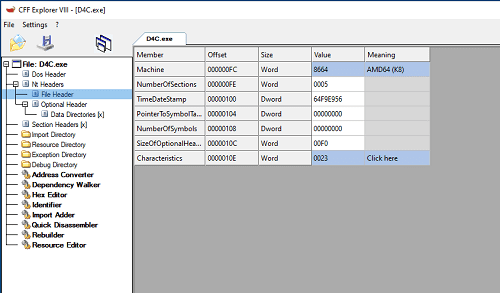
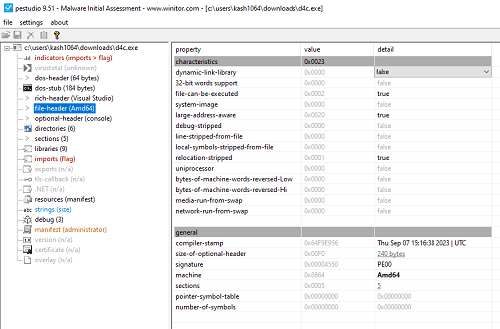
The information embedded in the file header of an executable created in PE format can be checked easily with tools such as CFF Explorer, included in Explorer Suite11, and PEStudio12.
For example, if you analyze D4C.exe, the executable used in this book, with CFF Explorer, you can obtain the following information.
If you analyze D4C.exe with PEStudio, you can likewise inspect the information embedded in the PE file header as shown below.
When a program runs within Windows, this header information is expanded into process memory in the following order.13
- Read the DOS header, PE header, and section header information from the file header.
- Use the section header information to map each section of the file into the address space allocated for the executing process.
- Refer to the list of DLLs in the import section, and load any DLLs that are not yet loaded into the system.
- Resolve the imported symbols in the import section.
- Create the stack and heap from the PE header information, create the initial thread, and start the process.
I do not explain this in detail in this book, but when analyzing dump files it is helpful to understand this kind of flow by which PE file information is loaded into a process’s memory region when a program runs.
Virtual addresses (VA) and relative virtual addresses (RVA)
As described above, the information for a program executed within Windows is expanded into a process memory region allocated to that specific program.
The contiguous memory region allocated to each program at that time is called the virtual address space (virtual memory).14
Windows 64-bit processes are assigned 128 TB of virtual address space, from 0x00000000000 to 0x7FFFFFFFFFFF, as their virtual address space.
This mechanism has several advantages. For example, it allows the OS to access memory regions that are not contiguous in physical memory as a single address range, and it makes it easier to relocate program code.
Other advantages of virtual memory include making it possible to run multiple applications in parallel within the OS and separating memory space on a per-process basis.15
When a program runs on Windows, its executable code is expanded into the process’s virtual memory region, and you can access that expanded executable code through virtual addresses (VAs).
Because virtual memory is mapped by the OS to physical memory and pages, an accessed virtual address is translated by the OS into an address in physical memory.16
By the way, a virtual address (VA) is the address obtained by adding the image base address assigned as the load address for each process to the relative virtual address (RVA), which is the address of the PE file after it is laid out in process memory.17
The image base address is usually assigned a different value every time a process runs because of Address Space Layout Randomization (ASLR), so keep in mind that the virtual address (VA) is also different each time.
For example, if you run the same program multiple times and collect a process dump each time, specifying the same address in each dump file may display different information.
That is because the addresses displayed when you load a process dump in WinDbg are virtual addresses (VAs).
Therefore, when analyzing a dump file, I recommend subtracting the image base address from the virtual address (VA) to obtain the relative virtual address (RVA), and then performing the analysis using relative offsets such as <module name> + RVA.
Assembly language
As mentioned above, information including the executable code defined in an executable file (PE file) is expanded into a series of virtual memory regions allocated to the process when the program runs.
When analyzing an application’s process dump in WinDbg, you can inspect the disassembly of that expanded executable code.
This book does not cover assembly language, but when you actually analyze dump files yourself, I think you will need to read the program’s behavior from assembly language.
There are several clear, high-quality introductory books that are just right for getting started with assembly language for the x64 architecture, so I list them in the notes.181920
If you want to study in more detail, I also recommend “大熱血! アセンブラ入門”21.
Registers
Registers are storage areas inside the CPU.
Compared with memory and storage, the amount of information they can hold is extremely small, but the CPU can access them very quickly, so they are used to store temporary information and the results of various calculations.
When debugging or analyzing dump files in WinDbg, you will inspect register information frequently.
Knowledge of registers is also indispensable when reading the assembly mentioned in the previous section.
This book does not go into detail about registers, but it does list the types and main uses of the general-purpose registers that are minimally necessary for dump file analysis.22
- Accumulator (RAX/EAX/AX/AL/AH): Used for various calculations. In the x64 calling convention, it is also important that function return values are stored here.23
- Base register (RBX/EBX/BX/BL/BH): Often used for addressing and similar purposes.
- Count register (RCX/ECX/CX/CL/CH): Often used for loops and shift/rotate instructions. In the x64 calling convention, it is also important that the first argument to a function call is stored here.23
- Data register (RDX/EDX/DX/DL/DH): Often used for calculations and similar operations. In the x64 calling convention, it is also important that the second argument to a function call is stored here.23
- Source index register (RSI/ESI/SI): Often used to point to the source pointer in data transfers such as stream operations.
- Destination index register (RDI/EDI/DI): Often used to point to the destination pointer in data transfers such as stream operations.
- Stack pointer (RSP/ESP/SP): Stores the pointer to the top of the stack. It is often used when you want to inspect a thread’s stack.
- Base pointer (RBP/EBP/BP): Stores the pointer to the base of the stack. It is important for following call stacks and similar tasks.
- Instruction pointer (RIP/EIP/IP): The instruction pointer; it stores the address of the next instruction to execute.
- Status flags (EFLAGS): Used to store status such as operation results. For example, they are also used to store the results of comparisons for conditional branches.
By the way, some registers, such as the accumulator register, are listed with multiple names such as RAX, EAX, and AX, and these names indicate how the register is being accessed.
For example, on an x64 architecture CPU, the accumulator register can store 64 bits of data, and accessing it as RAX means accessing the entire 64-bit region.
By contrast, accessing the accumulator register as EAX means accessing only the lower 32 bits of the accumulator register, which can store 64 bits of data.
In addition, AX means accessing the lower 16 bits, while AL means accessing the lower (LSB-side) 8 bits of the 16-bit region pointed to by AX, and AH means accessing the upper (MSB-side) 8 bits.
Summary of Chapter 3
In this chapter, I introduced the minimum background knowledge needed as a prerequisite for Windows dump analysis.
To analyze dump files, you need broad knowledge across fields that are generally considered difficult: OS and CPU topics such as registers, virtual memory, processes, and threads, as well as program-related topics such as the PE file format and assembly language.
However, because the prerequisite knowledge needed for dump file analysis is so broad, this chapter could not cover it thoroughly.
I do not think it is an exaggeration to say that the breadth and amount of required background knowledge are themselves part of what makes dump analysis such a high hurdle.
Still, to help readers who are just starting dump analysis feel it is a little more approachable, the dump analysis explained from Chapter 4 onward is structured to eliminate as much prerequisite knowledge as possible.
So even if you feel that you do not fully understand the items introduced in this chapter, please feel free to continue on to Chapter 4 and beyond.
I think the knowledge needed for analysis will gradually sink in as you read dump files, so for now, let’s simply enjoy the analysis.
Links to each chapter
- Preface
- Chapter 1: Environment Setup
- Chapter 2: Basic WinDbg Operations
- Chapter 3: Prerequisites for Analysis
- Chapter 4: Analyzing Application Crash Dumps
- Chapter 5: Analyzing Full Memory Dumps from System Crashes
- Chapter 6: Investigating User-Mode Application Memory Leaks from Process Dumps
- Chapter 7: Investigating User-Mode Memory Leaks from Full Memory Dumps
- Appendix A: WinDbg Tips
- Appendix B: Analyzing Crash Dumps with Volatility 3
-
Windows Internals, 7th Edition, Part 1, p.25 (by Pavel Yosifovich, Alex Ionescu, Mark E. Russinovich, David A. Solomon / translated by 山内 和朗 / 日系 BP 社 / 2018)
↩ -
User mode and kernel mode https://learn.microsoft.com/ja-jp/windows-hardware/drivers/gettingstarted/user-mode-and-kernel-mode
↩ -
ゼロからの OS 自作入門 (by 内田 公太 / マイナビ出版 / 2021)
↩ -
作って理解するOS x86系コンピュータを動かす理論と実装 (by 林 高勲 / supervised by 川合 秀実 / 技術評論社 / 2019)
↩ -
はじめてのOSコードリーディング ~UNIX V6で学ぶカーネルのしくみ (by 青柳 隆宏 / 技術評論社 / 2013)
↩ -
Xv6, a simple Unix-like teaching operating system https://pdos.csail.mit.edu/6.828/2012/xv6.html
↩ -
Windows Internals, 7th Edition, Part 1, p.9 (by Pavel Yosifovich, Alex Ionescu, Mark E. Russinovich, David A. Solomon / translated by 山内 和朗 / 日系 BP 社 / 2018)
↩ -
Windows Internals, 7th Edition, Part 1, p.115 (by Pavel Yosifovich, Alex Ionescu, Mark E. Russinovich, David A. Solomon / translated by 山内 和朗 / 日系 BP 社 / 2018)
↩ -
Windows Internals, 7th Edition, Part 1, p.19 (by Pavel Yosifovich, Alex Ionescu, Mark E. Russinovich, David A. Solomon / translated by 山内 和朗 / 日系 BP 社 / 2018)
↩ -
Windows Internals, 7th Edition, Part 1, p.210 (by Pavel Yosifovich, Alex Ionescu, Mark E. Russinovich, David A. Solomon / translated by 山内 和朗 / 日系 BP 社 / 2018)
↩ -
Explorer Suite https://ntcore.com/?page_id=388
↩ -
PEStudio https://www.winitor.com/download
↩ -
Linkers & Loaders, p.82 (by John R. Levine / translated by 榊原 一矢, ポジティブエッジ / オーム社 / 2001)
↩ -
Virtual address spaces https://learn.microsoft.com/ja-jp/windows-hardware/drivers/gettingstarted/virtual-address-spaces
↩ -
Essence of Computer Architecture, 2nd Edition, p.247 (by Douglas E. Comer / translated by 吉川 邦夫 / 翔泳社 / 2020)
↩ -
Windows Internals, 7th Edition, Part 1, p.408 (by Pavel Yosifovich, Alex Ionescu, Mark E. Russinovich, David A. Solomon / translated by 山内 和朗 / 日系 BP 社 / 2018)
↩ -
PE Format https://learn.microsoft.com/ja-jp/windows/win32/debug/pe-format
↩ -
詳解セキュリティコンテスト CTF で学ぶ脆弱性攻略の技術 (by 梅内 翼, 清水 祐太郎, 藤原 裕大, 前田 優人, 米内 貴志, 渡部 裕 / マイナビ出版 / 2021)
↩ -
デバッガによるx86プログラム解析入門 x64 対応版 (by Digital Travesia管理人 うさぴょん / 集和システム / 2018)
↩ -
リバースエンジニアリングツール Ghidra 実践ガイド セキュリティコンテスト入門からマルウェア解析まで (by 中島 将太, 小竹 泰一, 原 弘明, 川畑 公平 / マイナビ出版 / 2020)
↩ -
大熱血! アセンブラ入門 (by 坂井弘亮 / 秀和システム / 2017)
↩ -
デバッガによるx86プログラム解析入門 x64 対応版, p.33 (by Digital Travesia管理人 うさぴょん / 集和システム / 2018)
↩ -
x64 calling convention https://learn.microsoft.com/ja-jp/cpp/build/x64-calling-convention?view=msvc-170
↩